

All three use the same vulnerability index, sourced from osv.dev for the npm ecosystem and refreshed hourly. Superblocks also maintains a CVE exceptions list for packages that ship in Superblocks templates. Those packages have known advisories that Superblocks has reviewed as not exploitable in this platform, and that Superblocks cannot upgrade today, or that have no upgrade available.
Private registries control where packages come from. CVE detection decides which versions are safe to install and stay in production.
Install time
When Clark installs an npm package, Superblocks checks the requested package and version against the vulnerability index before the install runs.
If you named the package in chat and a CVE blocks it, Clark warns you. You can proceed with a short reason, which Superblocks records in the audit log. Malware blocks have no proceed path.
This is a gate, not a finding. It resolves before the package is ever installed, so there is no scan mode to configure and nothing to remediate later.
7-day cooldown
Brand-new npm releases are held back for 7 days before Superblocks installs them. If Clark requests a version published inside that window, Superblocks prefers the newest version outside it, when one exists. This reduces exposure to compromised or malicious fresh publishes without asking builders to track package age themselves.Publish time
At publish time, CVE detection re-checks the dependencies on the snapshot being published and contributes findings to the publish readiness checklist, alongside static analysis and the Security Agent. This catches what the install-time gate cannot: an advisory disclosed after the package was installed, and a transitive dependency pulled in later. Because these are findings on a publish, they follow the shared rules for severity, scan mode, and remediation described in How findings work.Continuous monitoring
Superblocks keeps evaluating published apps after they ship, so a newly disclosed CVE surfaces even when the application has not changed. Results land in Security Center.Security Center
Security Center lives under Security in the dashboard. What you see depends on your permissions:
Findings are grouped by app, prioritized by severity, and refreshed as new advisories appear.
You do not have to check it manually. Superblocks alerts you when a new critical or high CVE lands on a published app. See CVE notifications.
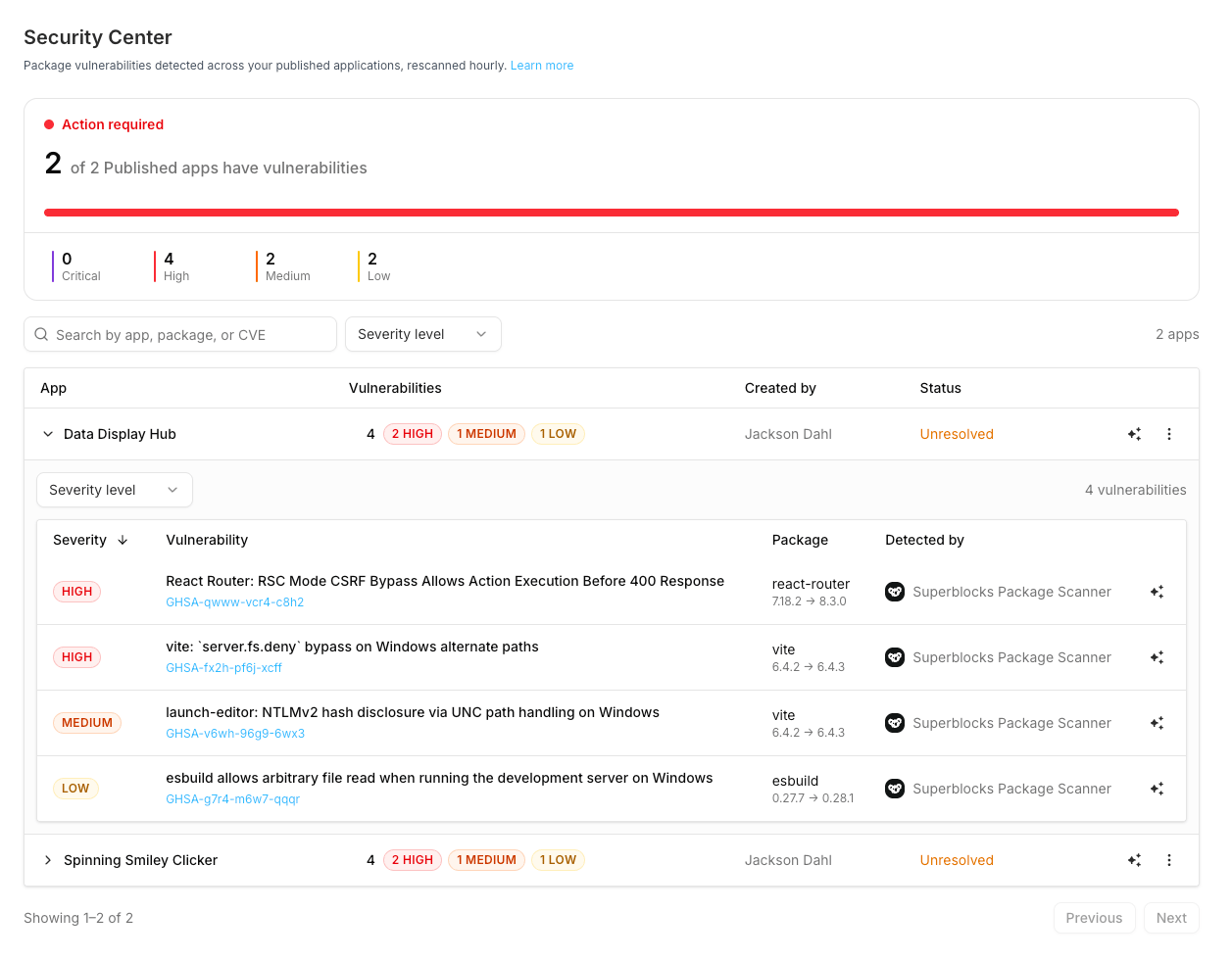
The Applications tab lists every application in the organization, so a row with no vulnerabilities means that app is clean. Only published apps are scanned. Click View details on a row to open its package inventory, described in SBOM. An app with open package vulnerabilities is Unresolved. Use Fix with Clark or Unpublish, described below.
Search by app name, package, or advisory ID. Filter by severity.
What is scanned
- Scope: published applications with a deployed commit
- Packages: dependencies from the deployed commit (
package.jsonplus lockfile-resolved versions when available) - Ecosystem: npm
- Advisory source: osv.dev npm feed
- Detector: Superblocks Package Scanner
Fix or unpublish
From Security Center, click Fix with Clark on an app or an individual advisory:- The app opens in the editor with a pre-built remediation prompt
- Clark upgrades vulnerable packages to safe versions and keeps the app building
- Publish or redeploy so the deployed package index updates
- Security Center reflects the remediated packages on the next scan
Permissions
policies:view is included for the Admin and Owner roles by default. A builder with no policies:view and no editable application cannot open Security Center at all.
An admin with policies:view can see every vulnerable app but can only fix or unpublish the ones they can deploy.