

- Dedicated Cloud is a single-tenant instance hosted by Superblocks in Superblocks Cloud.
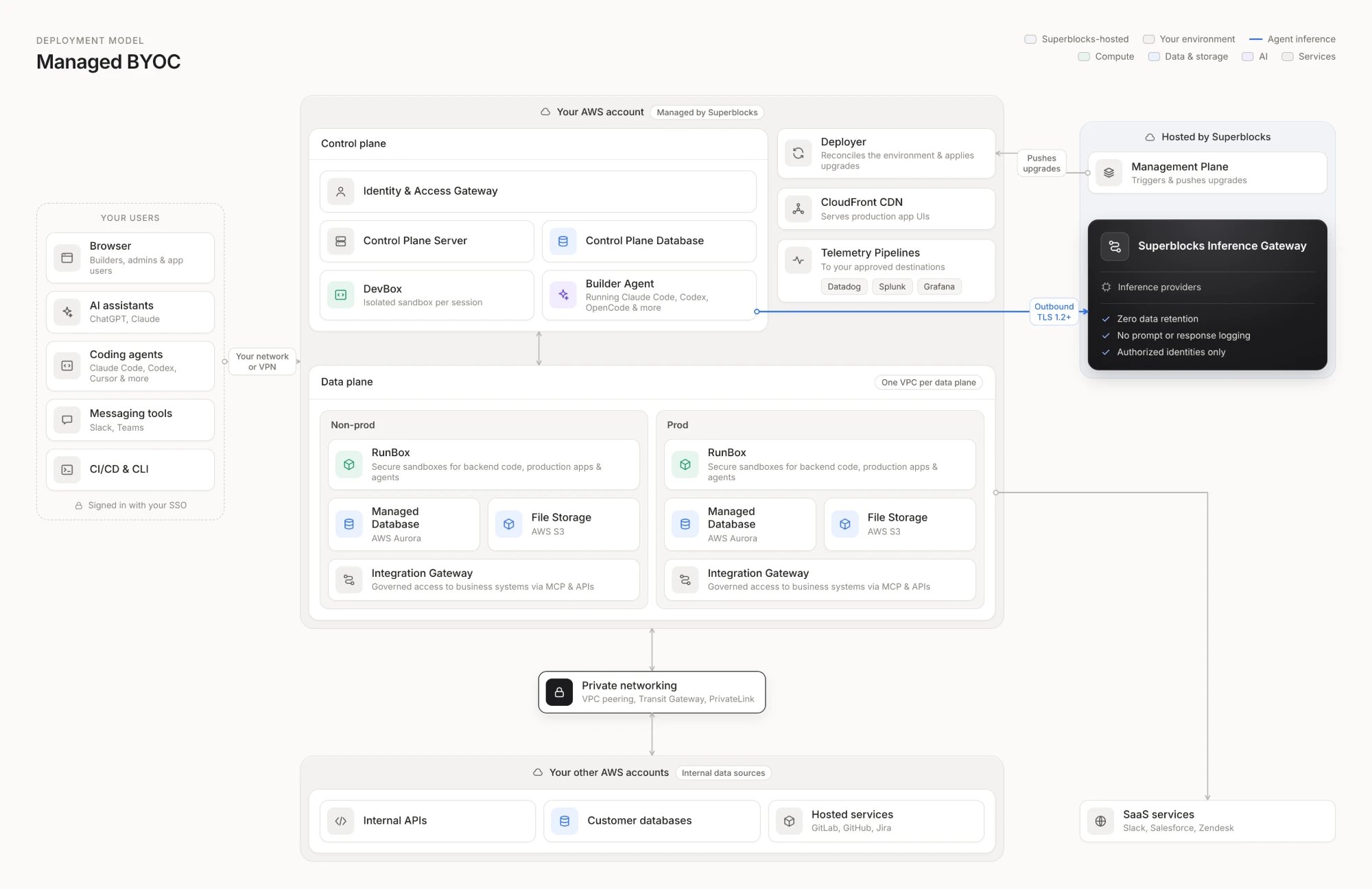
- Managed BYOC (bring your own cloud, previously called Cloud-Prem) is a single-tenant instance deployed to your AWS account and managed by Superblocks.
- Single-tenant: Your data is isolated in an instance that serves only your organization.
- Managed by Superblocks: Superblocks runs the infrastructure and the platform, including upgrades, patching, and monitoring.
- Support access: Superblocks keeps the access it needs to support and debug your instance.
Dedicated Cloud
Superblocks hosts a single-tenant instance for you in Superblocks Cloud. There’s no cloud account or infrastructure for your team to set up: Superblocks hosts the infrastructure, the platform, and AI inference.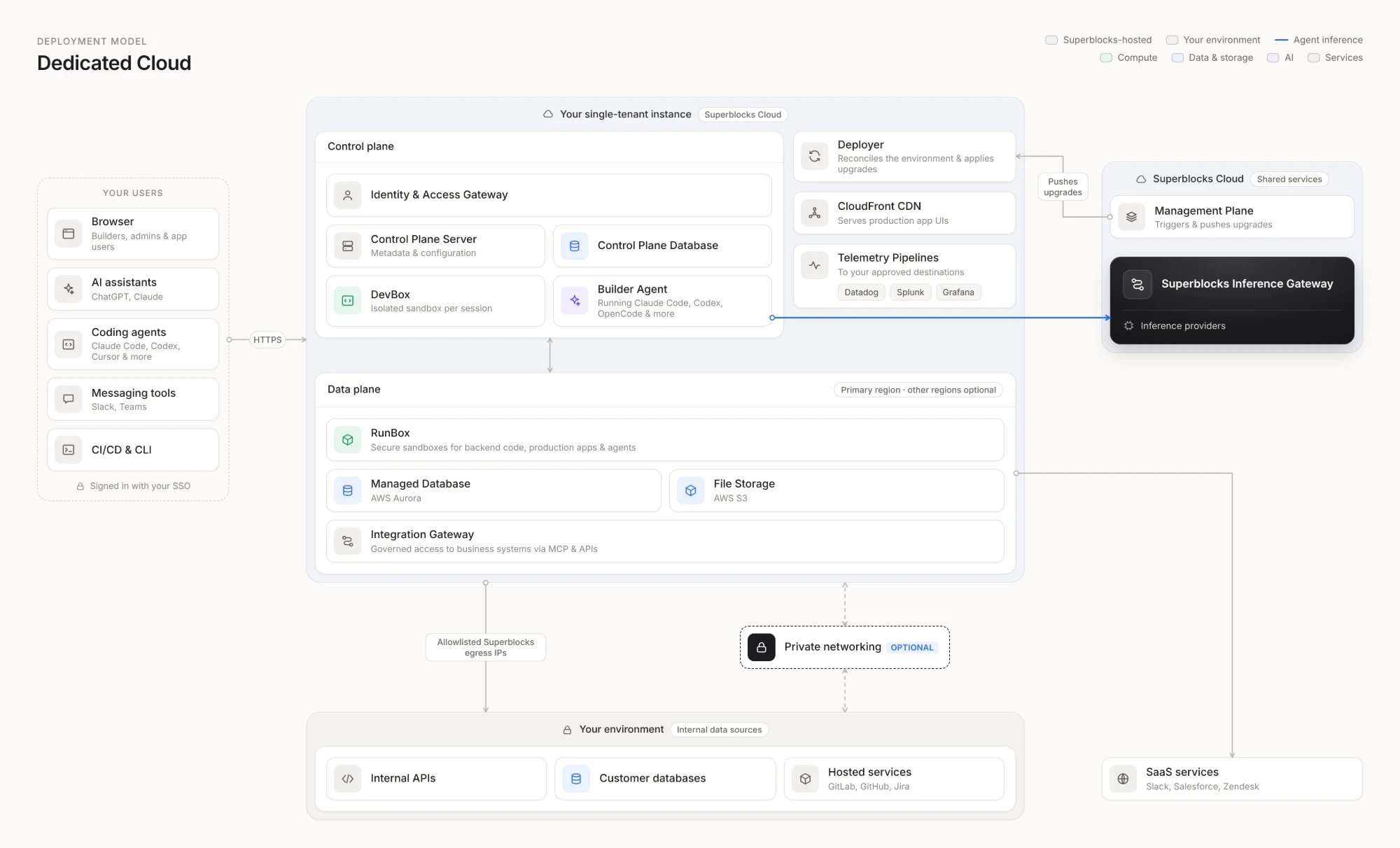
Dedicated Cloud advantages
- Fastest setup: No cloud account or infrastructure to prepare. Your team can start building right away.
- Built-in security controls: Traffic is encrypted with TLS 1.2 or 1.3, data at rest is encrypted with AES-256, and instances run on SOC 2 and ISO 27001 certified infrastructure.
- Global regions: Dedicated Cloud supports AWS regions around the world. You choose your primary region. Data planes can run in other regions, closer to your data.
- Flexible connectivity: Reach data sources by allowlisting your data plane’s IP addresses, or over private networking (coming soon). Private networking works across clouds, so it can also reach data in Google Cloud and Azure.
When to choose Dedicated Cloud
- You don’t want to host the infrastructure in your own cloud account.
- You want zero hosting, DevOps, infrastructure, or security burden on your team.
Managed BYOC
Superblocks deploys a single-tenant instance into your AWS account and runs it as a managed service. Application data and Clark chat history stay in your account. Managed BYOC runs on AWS only.Not a traditional self-hosted deployment. Managed BYOC runs in your account, but Superblocks deploys, upgrades, and operates it the same way it operates Dedicated Cloud. Superblocks keeps the minimal access it needs to do that, including break-glass access to your AWS account.
Managed BYOC advantages
- Data residency: Application data, Clark chat history, and platform data stay in your AWS account, in the region you choose.
- Networking inside your AWS account: Data planes run in your account and reach internal data sources over private networking, with support for AWS VPC endpoints local to the deployment.
- Additional security controls: Add AWS Network Firewall and WAF rule groups to control traffic, and apply your existing IAM policies, VPC controls, and security groups to the deployment.
- Visibility: Send telemetry to your own observability destinations, such as Datadog or Grafana.
- Dedicated Cloud spend optimization: Infrastructure runs in your AWS account and counts toward your existing AWS commitments.
When to choose Managed BYOC
- Your data must stay in your own AWS account.
- You need your platform telemetry and logs in your own tools for compliance or security.
- You want to apply your own AWS security controls to the deployment.
- You want to draw on existing AWS commitments.
Compare the models
Next steps
Dedicated Cloud
How a single-tenant Dedicated Cloud instance is run.
Managed BYOC deployment guide
How a Managed BYOC deployment works, from planning to go-live.