

OAuth 2.0 overview
OAuth 2.0 is an industry standard protocol for user authentication and authorization. Using OAuth 2.0, a remote API server can grant access to a client securely by issuing a short-lived access token.Glossary
The OAuth 2.0 spec, and it’s usage in Superblocks, comes with some important terms:- Client: The app that wants to access data
- App type: The type of Superblocks tool trying to access the data (App, Workflow, Scheduled Job)
- Resource server: The API that stores the data the client wants to access
- Resource owner: The owner of the data in the server
- Authorization server: The server that manages access and issues access tokens
- Access token: The token issued by the authorization server in exchange for the grant
- ID token: An optional token that contains information about the end user in the form of claims
- Refresh token: An optional token that is exchanged for a new access token if the access token has expired
OAuth 2.0 flows
OAuth 2.0 flows are often called “multi-legged” authorization flows because they involve multiple requests exchanged between the client, user, and server. For example, a usual OAuth 2.0 Authorization Code flow runs as follows:- A client makes a request for the user to authorize access to their data
- If the user grants access, the client requests an access token by passing the authorization grant to an authorization server
- If the grant is valid, the authorization server returns an access token, possibly alongside a refresh and/or ID token
- The client uses the access token in requests to the API server
- When the token expires, the client uses the refresh token to automatically request a new access token
Choosing an OAuth 2.0 flow
The OAuth 2.0 flow you use depends on your use case and flows supported by your API server. Reference API documentation to determine the flows supported by the API you intend to use. If your API supports multiple flows, use the following table to help decide which flow to use:Using OAuth 2.0
Authorization Code
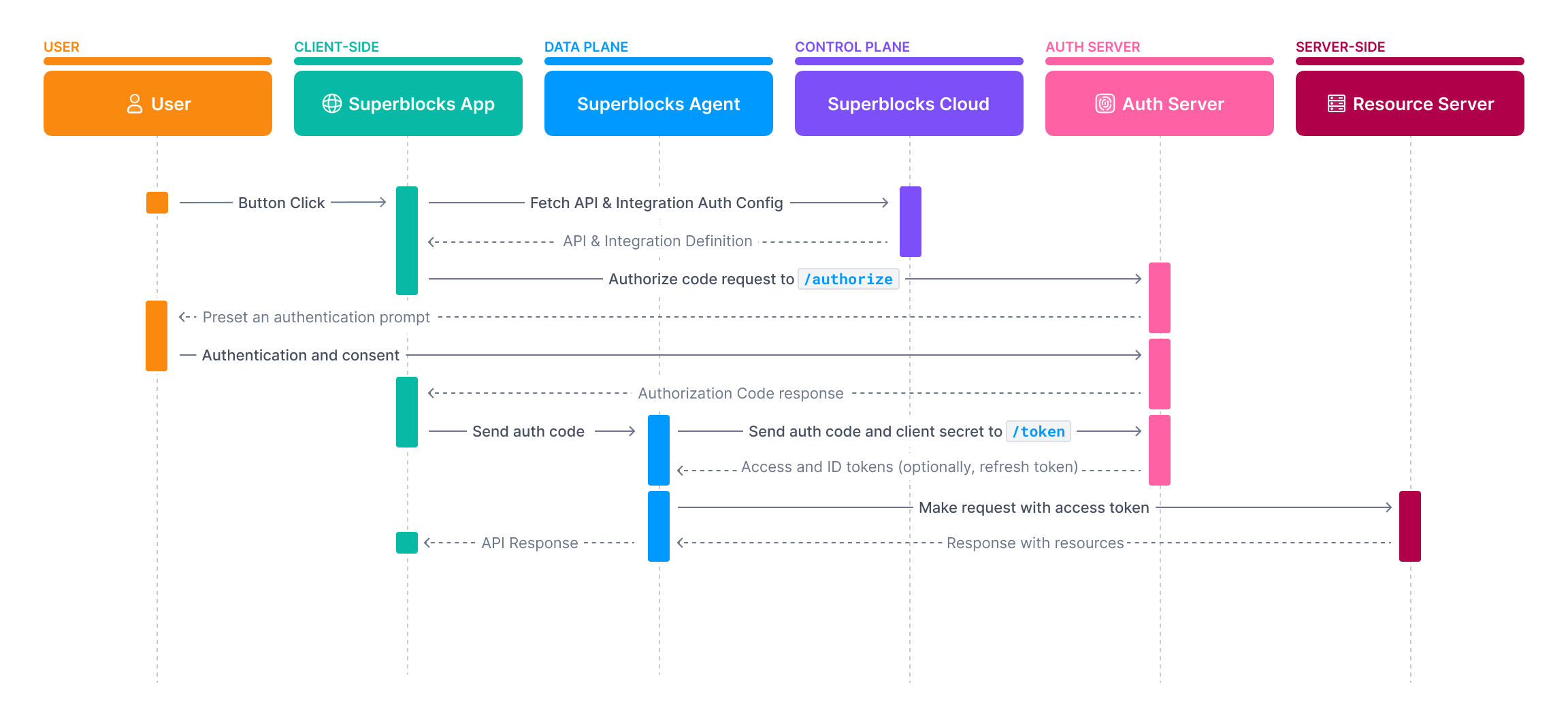
Authorization Code grants require a user to authenticate with the authorization server before an access token can be issued. After authenticating and granting access, an authorization code is sent back to Superblocks. The Superblocks Agent sends this token to the/token endpoint of the auth server to get an access token.
- In the Integration configuration select OAuth2 - Authorization Code
- Copy the Callback URL provided and add it to the Allowed Callback URLs of your OAuth client
-
Specify the following configuration values:
- If available, select Share access token across all users to use the same access token for all clients. If selected, click the Connect button to initiate the authorization flow.
-
Use the
oauthobject in Headers or Params to define how the token response is used. For example, to send the access token to subsequent requests in the Authorization header, set:
Full specification
Full specification
1. GET Authorization URL
Prompt user to log in and get an authorization codeRequest
Expected Response
2. POST Token URL
Exchange authorization code with authorization server for an access tokenRequest
If Client authentication is set to Send client credentials in bodyExpected Response
On-Behalf-Of Token Exchange
The On-Behalf-Of Token Exchange is a delegated access flow that lets a client exchange an access token received from an upstream client for a new token by interacting with an authorization server. In the case of Superblocks, this flows lets Superblocks exchange access tokens issued when a user logs in via an IdP, with an authorization server to get an access token to send to downstream servers. For example, let’s say your backend API is secured using tokens issued by Okta. This flow allows you to exchange a user’s Superblocks access token with an Okta authorization server to obtain access tokens for your backend API without requiring the user to log in again.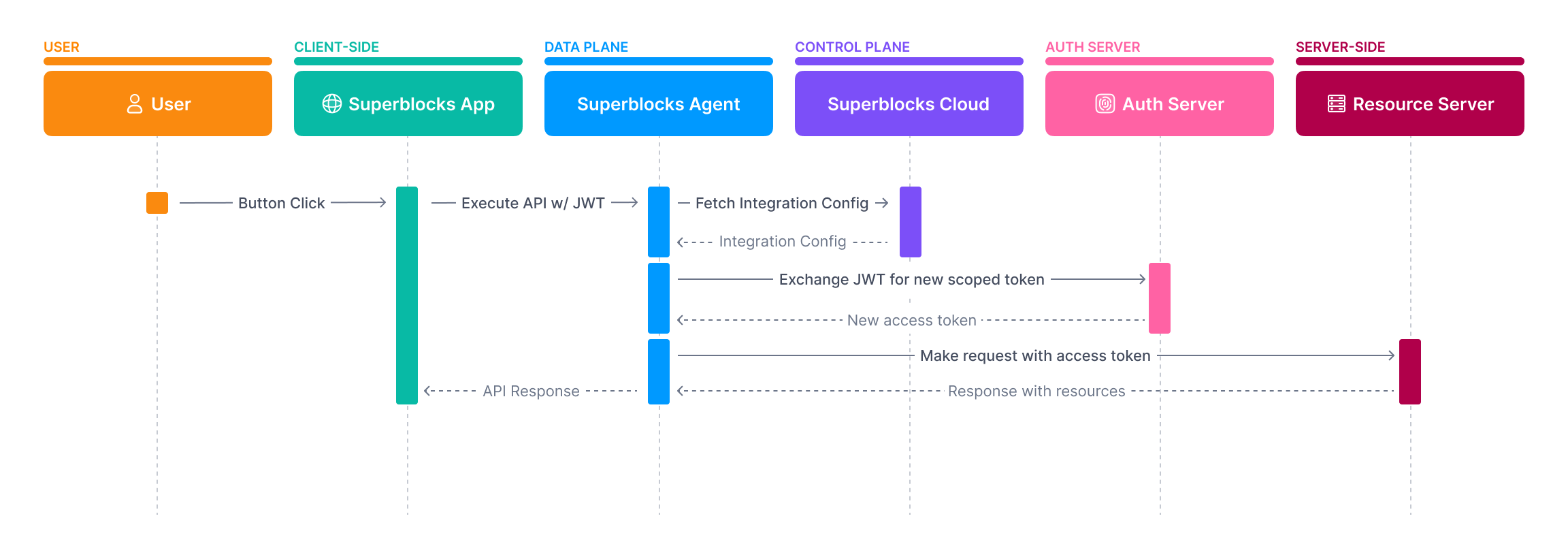
- In the Integration configuration select OAuth2 - On-Behalf-Of Token Exchange
-
Select a Subject token source
- Login Identity Provider: Use the token issued to Superblocks when users logged in as the
subject_token - Static Token: Provide a static token to use as the
subject_token
- Login Identity Provider: Use the token issued to Superblocks when users logged in as the
-
Specifying the following configuration values:
-
Use the
oauthobject in Headers or Params to define how the token response should be sent to the resource server. For example, to send the access token as an Authorization header, set:
/token endpoint of the authorization server, including in the request a subject_token based on the source selected. After an access token is returned, it is cached to improve future API performance. Once the token expires, Superblocks reinitiates the token exchange for you.
If you use your IdP as the source of the subject token and the IdP token has expired, the user will be prompted to log in again to obtain a new subject token.
Learn more about token caching and refresh
Full specification
Full specification
POST Token URL
Exchanging user’s JWT issued at login or static token for new access tokenRequest
Expected Response
Client Credential
Client credential grant types are typically not used to access user data but instead for machine-to-machine communication. When an API executes, Superblocks exchanges OAuth client information with the authorization server to get an access token. That token is then used in the subsequent request.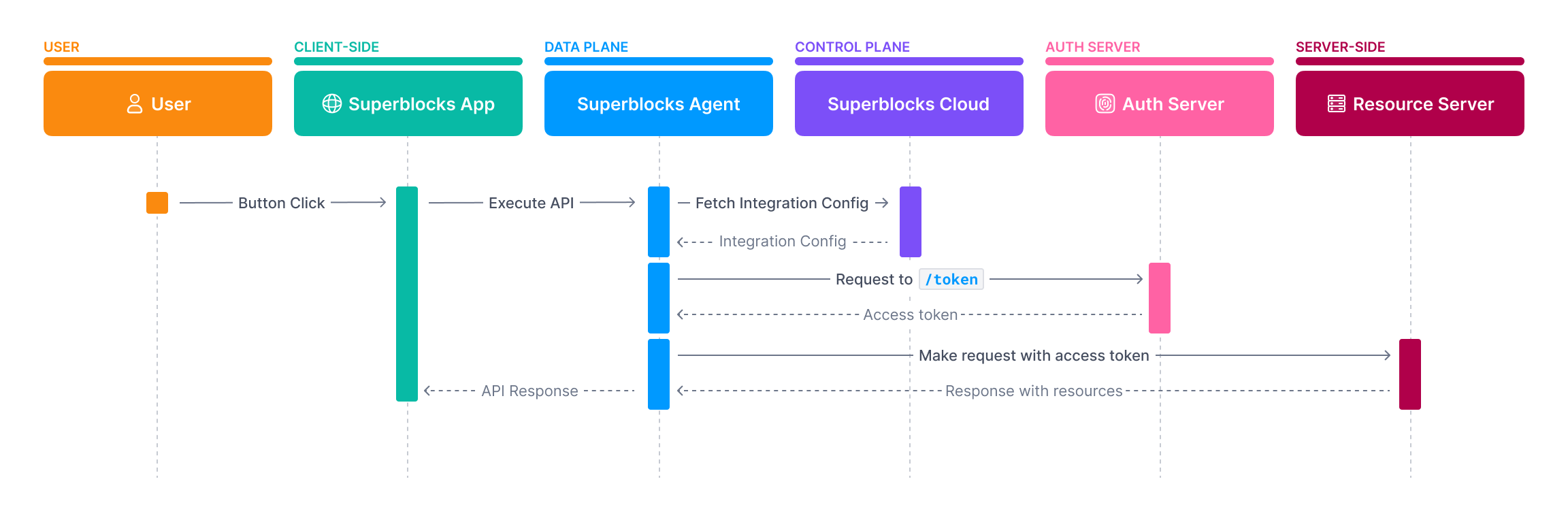
- In the Integration configuration select OAuth2 - Client Credentials Grant
-
Specify the following configuration values:
-
Use the
oauthobject in Headers or Params to define how the token response should be sent to the resource server. For example, to send the access token as an Authorization header, set:
Full specification
Full specification
Implicit
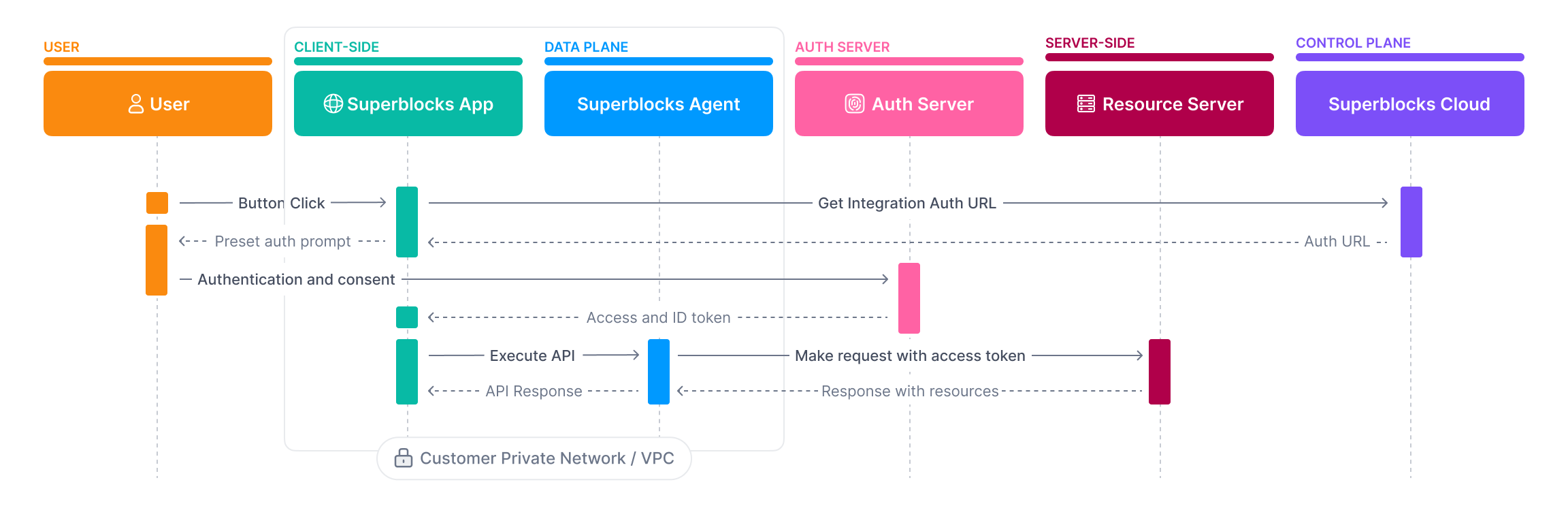
Implicit flows are primarily intended for browser-based apps that don’t support Cross-Origin Resource Sharing (CORS) or lack modern cryptography APIs. In this flow, the client doesn’t make a request to a/token endpoint, but instead receives the access token in the redirect from the /authorize endpoint.
- In the Integration configuration select OAuth2 - Implicit Grant
- Copy the Callback URL provided and add it to the Allowed Callback URLs of your OAuth client
-
Specify the following configuration values:
-
Use the
oauthobject in Headers or Params to define how the token response should be sent to the resource server. For example, to send the access token as an Authorization header, set:
Full specification
Full specification
Password Grant (Legacy)
The Password Grant (Legacy) flow, sometimes referred to as a Resource Owner Password flow, is an OAuth flow intended for highly-trusted apps that can’t do redirects. With this flow, either the Integration Configurer or an end-user will provide a username and password. These credentials will be sent to the/token endpoint, which then responds with a short-lived access token.
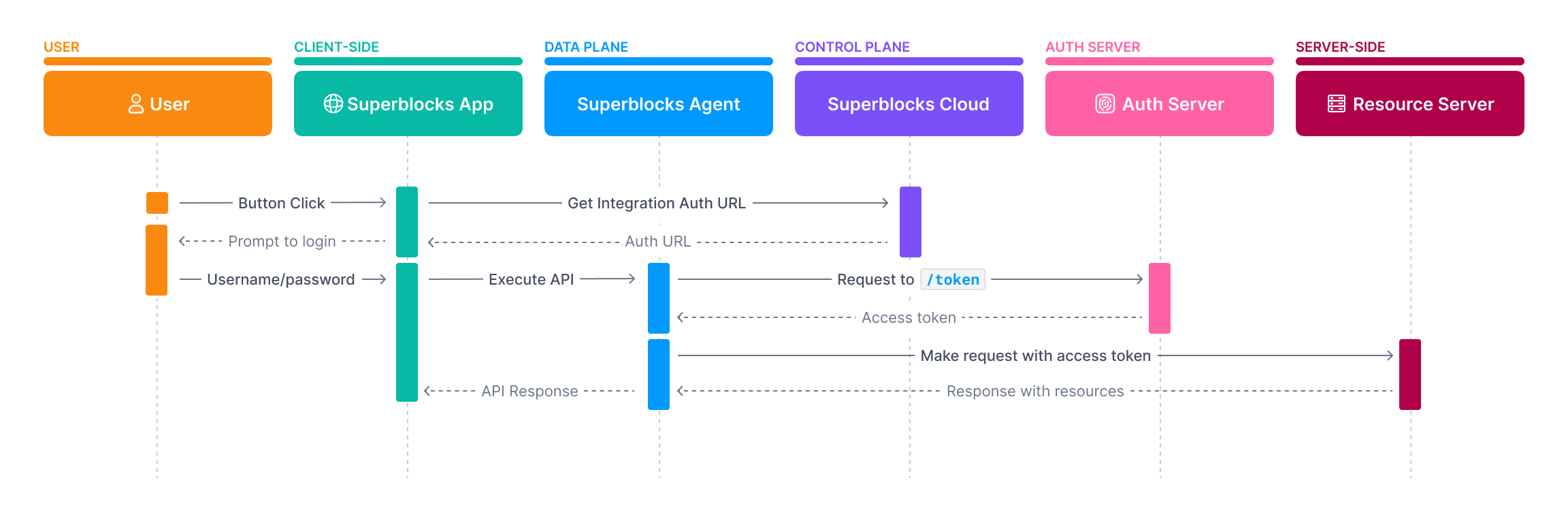
- In the Integration configuration select OAuth2 - Password Grant (Legacy)
-
Specify the following configuration values:
- If you want to use shared credentials, check Share username/password across all users and provide the shared username & password
-
Use the
oauthobject in Headers or Params to define how the token response should be sent to the resource server. For example, to send the access token as an Authorization header, set:
Full specification
Full specification
The oauth object
The results of an OAuth 2.0 exchange can be referenced in your Integration configuration using the oauth object. The oauth object has the following properties.
Token caching and refresh
This section includes specifics on how OAuth 2.0 access tokens are handled. For more information on sessions management see our guide on Credential & Session ManagementHow tokens are cached
OAuth 2.0 flows result in an access token that is used when making requests to a service. Once an access token is obtained through an OAuth flow, it is cached by Superblocks based on both the OAuth client generating the token (client_id, audience, scopes, etc) and the user for whom the token was issued.
Because tokens are cached based on the OAuth client, you can use the same OAuth client across integrations. If a user already has a cached token for the OAuth client from a different integration, Superblocks will use that cached token, even when executing requests with integrations the user has never used.
Caching reduces the need for repeated authentication requests, improving performance and the user experience of your Superblocks app.