

VPC layout
A Managed BYOC instance needs one VPC for the control plane and one for each data plane, all in your Managed BYOC AWS account. You can use your own VPC for any of them; Managed BYOC builds the rest.- Control plane VPC. One, in a supported control plane region. It holds the control plane’s EKS cluster, its database, the deployer, Superblocks agents, and the internet-facing load balancer for your instance.
- Data plane VPCs. One for each data plane, in a supported data plane region. Two data planes can’t share a VPC.
VPC requirements
Every VPC you use, for the control plane or a data plane, must meet these requirements. The bootstrap checks most of them when you run it, and stops with a message naming the VPC or subnet that fails the requirement check. Routing isn’t checked until deployment.- DNS is turned on. The VPC must have both DNS resolution and DNS hostnames turned on.
- At least two availability zones. We recommend three for the control plane, the same number Superblocks uses when it creates the control plane VPC. Identify zones by AZ ID, such as
usw2-az1, not by AZ name, such asus-west-2a, and avoid the AZ IDs that aren’t supported. Each subnet must be in the VPC and in the zone it’s listed under. - Subnets in the primary CIDR. Every subnet must be inside the VPC’s primary IPv4 CIDR. Subnets in a secondary CIDR aren’t supported.
- Separate database, public, and agent subnets. A database or public subnet can’t serve any other purpose, and an agent subnet can only be shared between agent types. The node, EKS control plane, and private subnets can be one subnet. See Subnets.
- Tagged node subnets. Each node subnet must have the
karpenter.sh/discoverytag, or Managed BYOC can’t launch cluster nodes. If nodes share your private subnet, tag the private subnet; Managed BYOC can then launch nodes anywhere in it. The tag value is your cluster name for the control plane, and<cluster name>-dp-<data plane ID>for each data plane, using the cluster name and data plane IDs you set in the bootstrap. - Large enough data plane node subnets. A data plane’s node subnet must be a
/22or larger, because nodes and their pods take their IP addresses from it. If nodes share your private subnet, the private subnet must be a/22or larger. - An outbound path. Managed BYOC must reach the required outbound domains from your VPC, through a NAT gateway, a transit gateway, or a proxy. A NAT gateway in the VPC sits in a public subnet that routes to an internet gateway. In a data plane VPC, that public subnet is your own: Managed BYOC doesn’t use it.
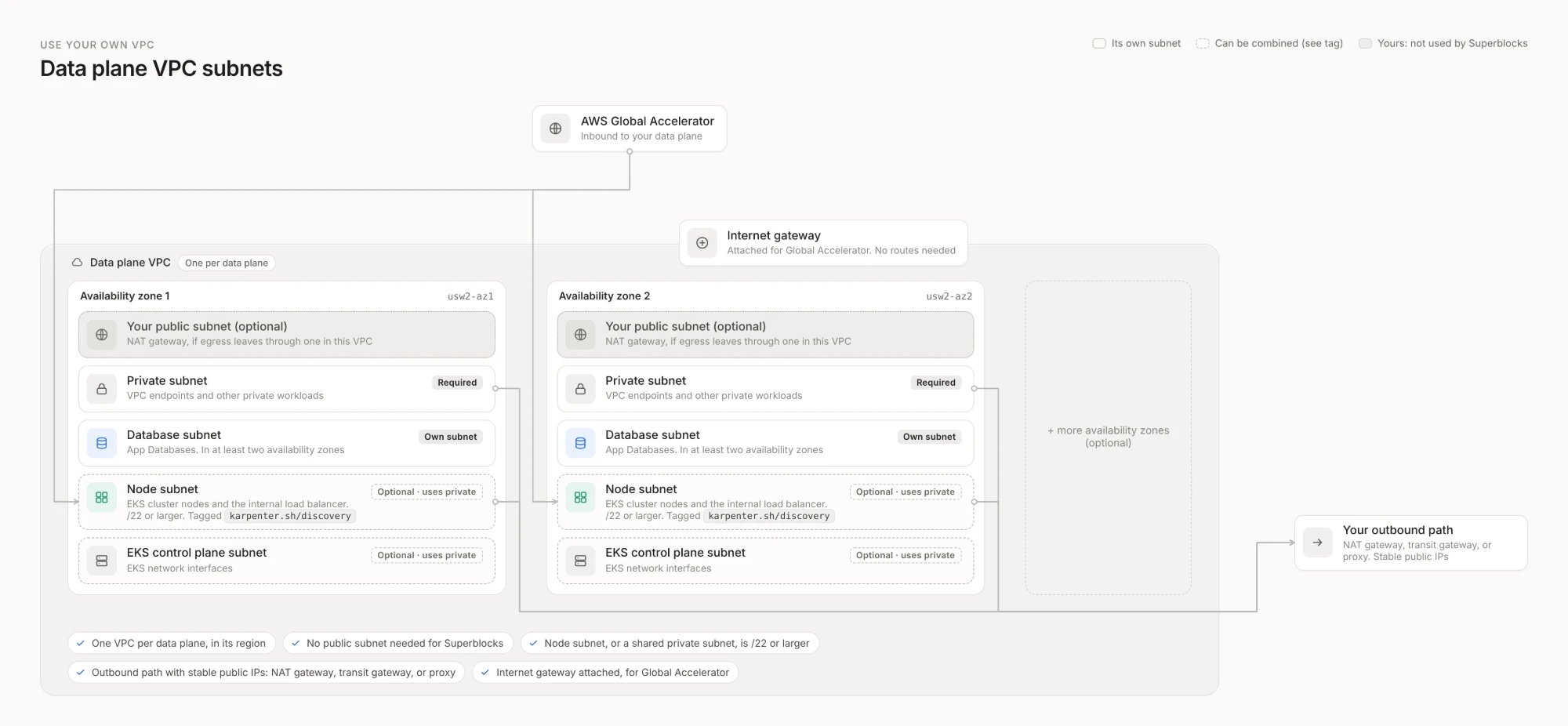
- An internet gateway on each data plane VPC. Users reach a data plane through AWS Global Accelerator, which delivers traffic over the AWS network to an internal load balancer in your node subnets. AWS requires an internet gateway attached to the VPC to show that it accepts internet traffic, but Global Accelerator doesn’t route through it. Your subnets don’t need routes to the internet gateway, and nothing needs a public IP address.
- A path to AWS APIs and container images. Cluster nodes and the deployer call AWS APIs and pull container images through your outbound path or through VPC endpoints.
Subnets
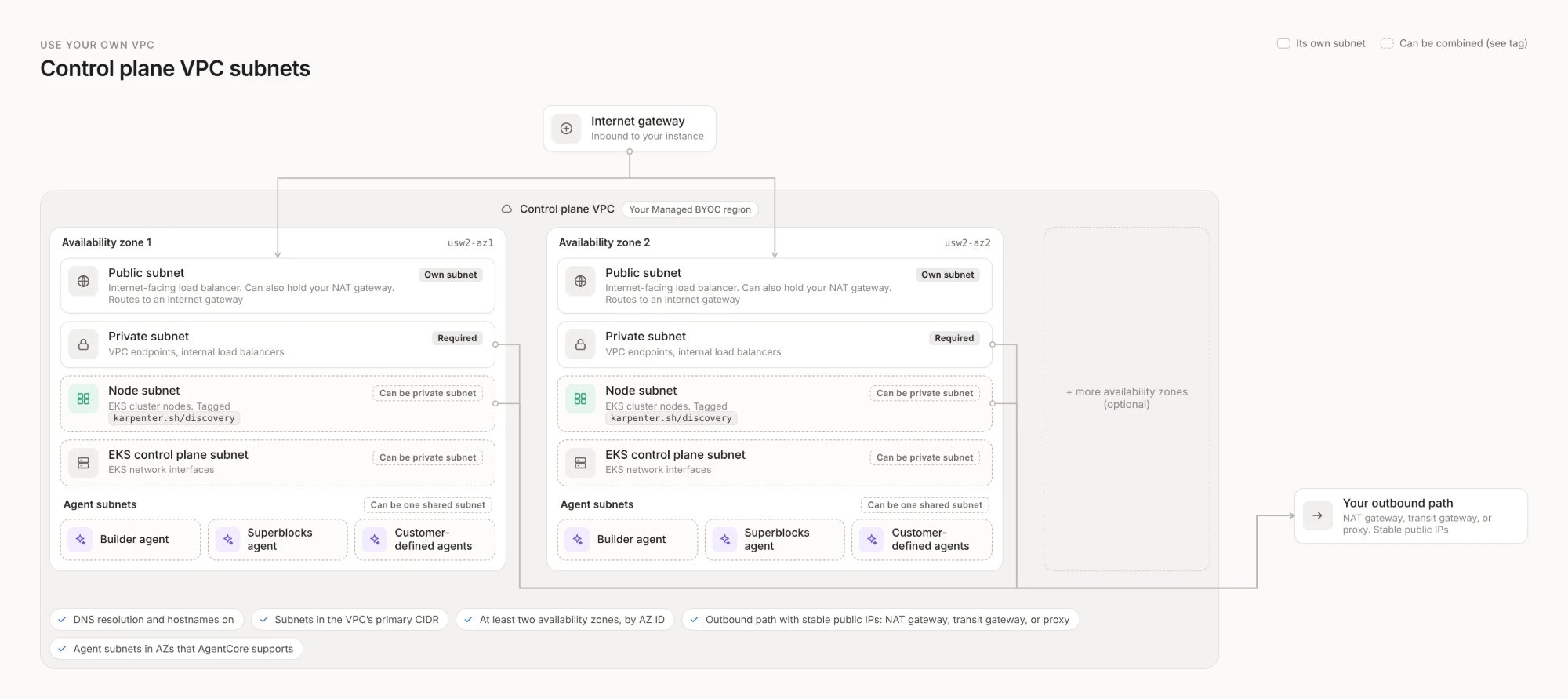
Your private subnet can also hold your nodes and the EKS control plane’s network interfaces. Database, public, and agent subnets must each be their own subnet, so at a minimum the control plane needs public, private, and agent subnets, and each data plane needs private and database subnets. Each VPC uses at least two availability zones, with these subnets in every zone. Agent subnets only need to be in zones that AgentCore supports, at least two.Control plane
Agent subnets
The control plane VPC also needs subnets for Superblocks agents. Agents run on Amazon Bedrock AgentCore in your Managed BYOC account. Each agent session runs in its own AWS-managed microVM, with its network interface in your agent subnets.- A subnet for each agent type. In at least two availability zones that AgentCore supports, give the builder agent, the Superblocks agent, and customer-defined agents each their own subnet. Separate subnets let Superblocks apply network ACLs to each agent type, and let you capture each agent type’s traffic separately with your own VPC Flow Logs.
- Or one shared agent subnet. You can use a single agent subnet in each availability zone for all three agent types instead. It must be its own subnet: it can’t be your private subnet.
- Availability zones that AgentCore supports. AgentCore runs only in certain availability zones in each region. Create agent subnets only in zones it supports, so they may not cover every zone your VPC uses. See the AZ IDs AgentCore doesn’t support in each control plane region.
- No route to the internet. Agent subnets can’t route to a NAT gateway, an internet gateway, or any other outbound path, so they can’t be your private or node subnets. Agents reach only the Superblocks internal load balancer and VPC endpoints, and accept no inbound traffic.
Data planes
Subnet sizes
Each subnet must be at least the minimum size in every availability zone.- Subnets with a load balancer (public and private) need at least eight free IP addresses.
- Node subnets hold your nodes and their pods, so they need the most room.
- If your nodes or EKS control plane share your private subnet, size it for everything in it.
VPC endpoints
The control plane VPC needs the endpoints marked required below, even if it has a NAT gateway, because agent subnets have no internet route. The rest are optional: create them to keep AWS traffic off your outbound path.
Endpoints only reach AWS services in your VPC’s own region. Without image mirroring, Superblocks container images come from the Superblocks registry in
us-east-1, so outside us-east-1 they’re pulled over your outbound path.
Egress IP addresses
Managed BYOC publishes the public IP addresses its outbound traffic leaves from, so you can add them to the allowlists of databases and APIs your apps connect to. With your own VPC, Managed BYOC finds these addresses from the available public NAT gateways in the VPC. Set your egress IP addresses in the bootstrap instead when:- Outbound traffic doesn’t leave through a NAT gateway in the VPC. For example, it goes through a transit gateway, a shared egress VPC, or a proxy.
- The VPC is shared with other workloads. Some of its NAT gateways may not be used by Managed BYOC.
/32 CIDR, such as 203.0.113.10/32.
Use your VPC
- Set up your VPC to meet the VPC requirements, tag each node subnet, and add agent subnets to the control plane VPC.
- Run the bootstrap’s setup script. It creates the bootstrap’s settings file,
superblocks.tfvars. - In
superblocks.tfvars, add the VPC settings for the control plane and for each data plane that uses your VPC. - Run the bootstrap. It checks each VPC against the requirements and fails, naming the VPC or subnet, if one isn’t met.
- Tell your deployment team. Superblocks deploys into your VPC at the next deployment.
Bootstrap settings
Control plane settings
The setup script writes anetwork setting with a subnets block that describes a VPC for Managed BYOC to build. Replace subnets with an existing block that describes your VPC, and set vpc_cidr to your VPC’s primary CIDR. Keep your tags value. For example:
Set either
subnets or existing, not both, or the bootstrap fails.
Data plane settings
The setup script writes adataplanes setting with each data plane’s region and data tags. Add a network block to each data plane that uses your VPC. For example: