

The Superblocks data plane can be deployed on a virtual machine with Docker Compose. Note, this method is not as scalable as using container management services like AWS ECS Fargate or Google Cloud Run. If you use this method in production, we recommend deploying on a minimum of 3 instances.

Deploy

Follow the steps below to deploy the data plane on a virtual machine.

Launch VM

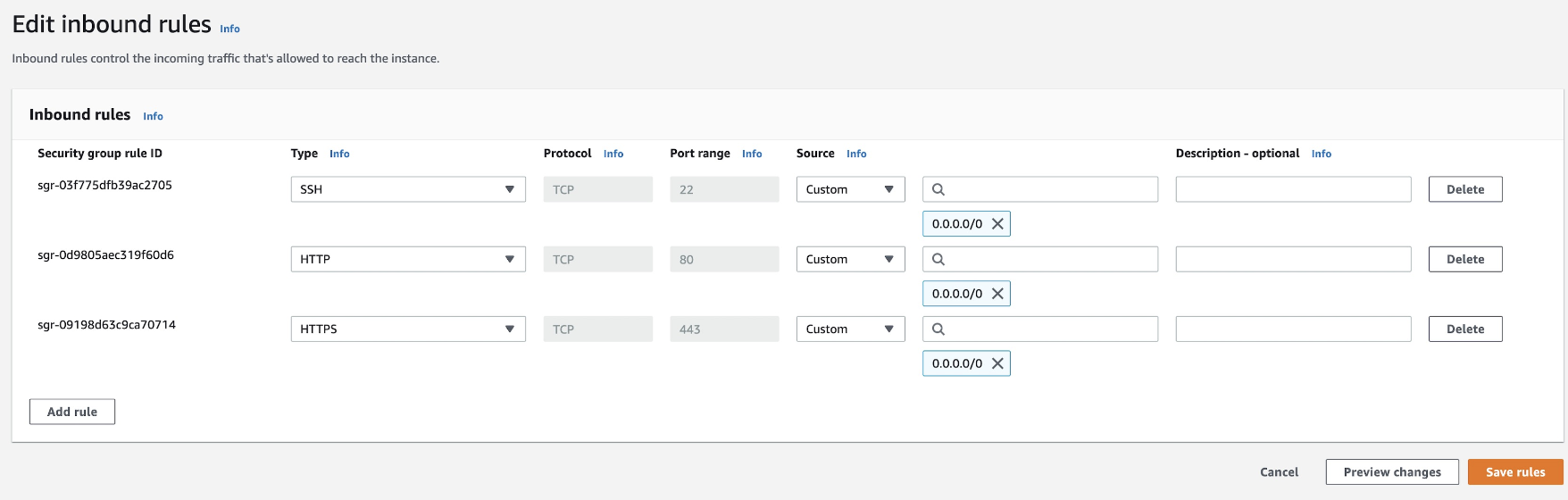
Launch a virtual machine using Amazon Linux, Ubuntu, CentOS, or Debian. The instance should have at least 2 GiB of memory and 20 GiB of storage. Make sure the instance’s security group allows inbound traffic on HTTP port 80 and HTTPS port 443. Example below for an AWS EC2 instance. data plane security group inbound rules
Create CNAME or A record

Next, create a CNAME or A record of a custom domain pointed to the IP address of the VM. This custom domain will be used in the agent configuration.

Install agent

1. Download script on VM
2. Configure agent variables
To generate a SUPERBLOCKS_AGENT_KEY, go to the Superblocks Setup Wizard.
Note, SUPERBLOCKS_AGENT_HOST_URL is the custom domain configured under prerequisites.
If you use the EU Superblocks instance, set SUPERBLOCKS_AGENT_DATA_DOMAIN to eu.superblocks.com.
3. Start the service When starting for the first time, this will install docker and pull docker images.
4. Verify After the installation completes, check that the service is successfully deployed and can be connected to locally.
To validate that the service is up and available over https, visit https://YOUR.VALID.DOMAIN.COM/health.
Verify data plane custom domain via HTTPS

Billable services

When running the data plane on a virtual machine, it is important to be aware of your cloud provider’s instance pricing (i.e. EC2, GCE, Azure VM) and the cost of any associated infrastructure like networking, load balancers, and DNS.
