> ## Documentation Index
> Fetch the complete documentation index at: https://docs.superblocks.com/llms.txt
> Use this file to discover all available pages before exploring further.
# Firebase authentication
export const Alert = ({type, title, children}) => {
const getIcon = () => {
switch (type) {
case 'info':
return "data:image/svg+xml,%3Csvg xmlns='http://www.w3.org/2000/svg' width='20' height='20' viewBox='0 0 20 20' fill='none'%3E%3Cpath d='M10 0C4.477 0 0 4.477 0 10s4.477 10 10 10 10-4.477 10-10S15.523 0 10 0zm0 15c-.552 0-1-.448-1-1s.448-1 1-1 1 .448 1 1-.448 1-1 1zm1-3H9V6h2v6z' fill='%230099FF'/%3E%3C/svg%3E";
case 'success':
return "data:image/svg+xml,%3Csvg width='20' height='20' viewBox='0 0 20 20' fill='none' xmlns='http://www.w3.org/2000/svg'%3E%3Cpath fill-rule='evenodd' clip-rule='evenodd' d='M10 0C4.477 0 0 4.477 0 10s4.477 10 10 10 10-4.477 10-10S15.523 0 10 0zm4.293 6.293L9 11.586 5.707 8.293c-.391-.391-1.024-.391-1.414 0s-.391 1.024 0 1.414l4 4c.391.391 1.024.391 1.414 0l6-6c.391-.391.391-1.024 0-1.414s-1.024-.391-1.414 0z' fill='%230CC26D'/%3E%3C/svg%3E";
case 'warning':
return "data:image/svg+xml;charset=utf-8;base64,PHN2ZyB4bWxucz0naHR0cDovL3d3dy53My5vcmcvMjAwMC9zdmcnIHhtbDpzcGFjZT0ncHJlc2VydmUnIHdpZHRoPScxMDgwJyBoZWlnaHQ9JzEwODAnPjxyZWN0IHdpZHRoPScxMDAlJyBoZWlnaHQ9JzEwMCUnIGZpbGw9J3RyYW5zcGFyZW50Jy8+PHBhdGggZD0nTTEzLjc5NCAxMC43NSA4LjMgMS4yNWExLjUgMS41IDAgMCAwLTIuNiAwbC01LjQ5NCA5LjVBMS40OTQgMS40OTQgMCAwIDAgMS41IDEzaDExYTEuNDkzIDEuNDkzIDAgMCAwIDEuMjk0LTIuMjVNNi41IDUuNWEuNS41IDAgMCAxIDEgMFY4YS41LjUgMCAwIDEtMSAwek03IDExYS43NS43NSAwIDEgMSAwLTEuNS43NS43NSAwIDAgMSAwIDEuNScgc3R5bGU9J3N0cm9rZTpub25lO3N0cm9rZS13aWR0aDoxO3N0cm9rZS1kYXNoYXJyYXk6bm9uZTtzdHJva2UtbGluZWNhcDpidXR0O3N0cm9rZS1kYXNob2Zmc2V0OjA7c3Ryb2tlLWxpbmVqb2luOm1pdGVyO3N0cm9rZS1taXRlcmxpbWl0OjQ7ZmlsbDojZmY5ZjM1O2ZpbGwtcnVsZTpub256ZXJvO29wYWNpdHk6MScgdHJhbnNmb3JtPSd0cmFuc2xhdGUoLjAyIDE5LjMwNSlzY2FsZSg3Ny4xNCknLz48L3N2Zz4=";
case 'danger':
return "data:image/svg+xml,%3Csvg width='20' height='20' viewBox='0 0 20 20' fill='none' xmlns='http://www.w3.org/2000/svg'%3E%3Cpath d='M10 0C4.477 0 0 4.477 0 10s4.477 10 10 10 10-4.477 10-10S15.523 0 10 0zm5.707 4.293L10 9.586 4.293 4.293c-.391-.391-1.024-.391-1.414 0s-.391 1.024 0 1.414L8.586 11l-5.707 5.293c-.391.391-.391 1.024 0 1.414s1.024.391 1.414 0L10 12.414l5.707 5.293c.391.391 1.024.391 1.414 0s.391-1.024 0-1.414L11.414 11l5.707-5.293c.391-.391.391-1.024 0-1.414s-1.024-.391-1.414 0z' fill='%23F45252'/%3E%3C/svg%3E";
case 'note':
return "data:image/svg+xml,%3Csvg xmlns='http://www.w3.org/2000/svg' width='20' height='20' viewBox='0 0 20 20' fill='none'%3E%3Cpath d='M10 0C4.477 0 0 4.477 0 10s4.477 10 10 10 10-4.477 10-10S15.523 0 10 0zm0 15c-.552 0-1-.448-1-1s.448-1 1-1 1 .448 1 1-.448 1-1 1zm1-3H9V6h2v6z' fill='%230099FF'/%3E%3C/svg%3E";
default:
return "";
}
};
return
{title &&
{title}
}
{children}
;
};
Firebase authentication is a service for securely signing users into applications. It supports authentication using passwords, phone numbers, popular federated identity providers like Google, Facebook, Twitter, and more. Use the Firebase authentication method to quickly integrate with your existing Firebase user base and manage access to Firebase functions without complex custom authentication setups.
The official Firebase auth documentation provides more detail:
* [Firebase authentication](https://firebase.google.com/docs/auth)
## Using Firebase authentication
Since a user must log in when using Firebase auth, integrations that use this auth method can't be used in Workflows or Scheduled Jobs
Use the following instructions to set up Firebase authentication.
### Get Firebase auth config
1. Navigate to your project in the [Firebase console](https://console.firebase.google.com)
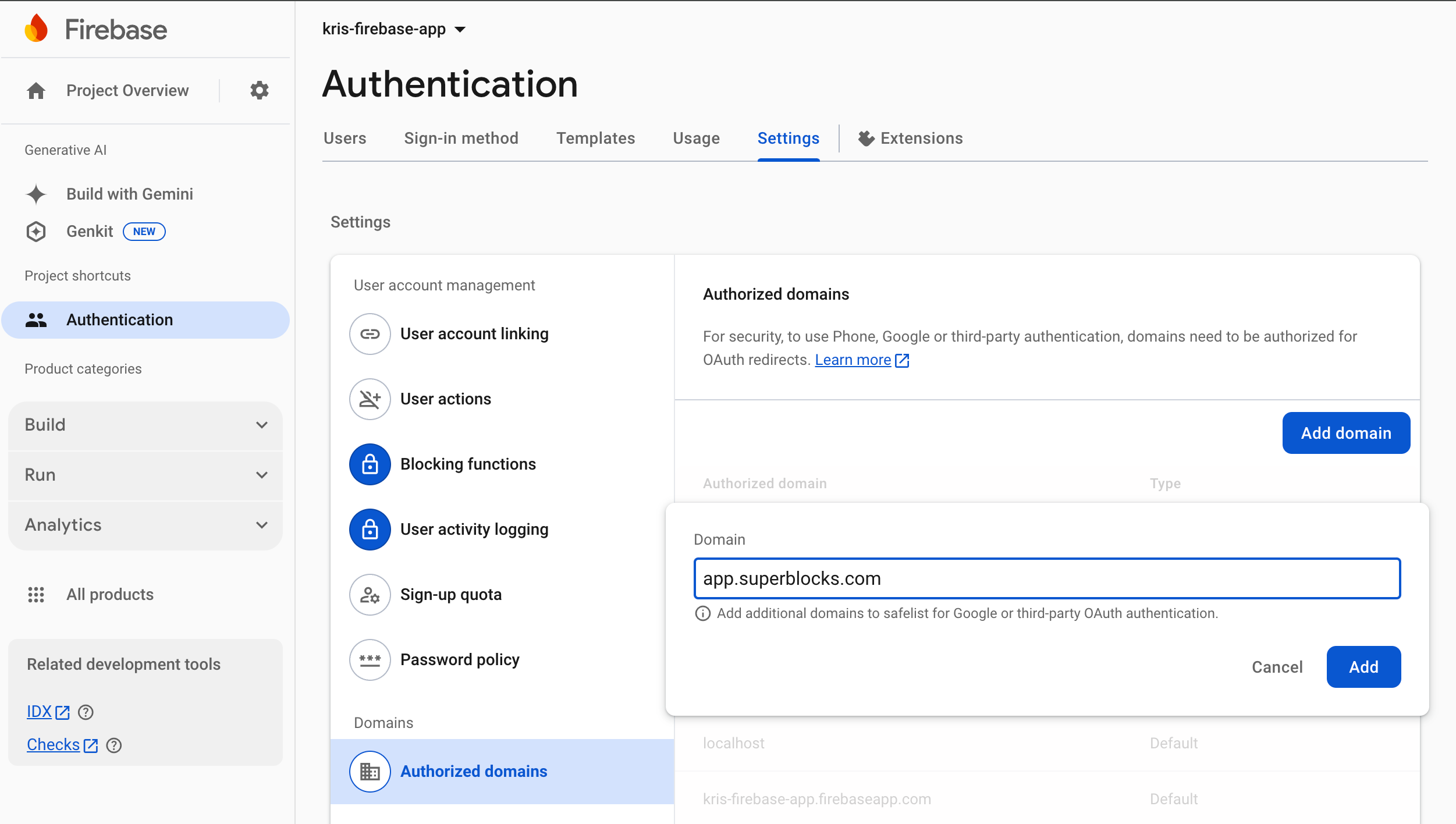
2. In the console, go to the **Authentication** section
3. Click on the **Settings** tab followed by **Authorized domains**
4. Click **Add domain** and add either `app.superblocks.com` or `eu.superblocks.com`
 5. From the **Project overview** page, click **Add app** and select **Web** as your app's platform
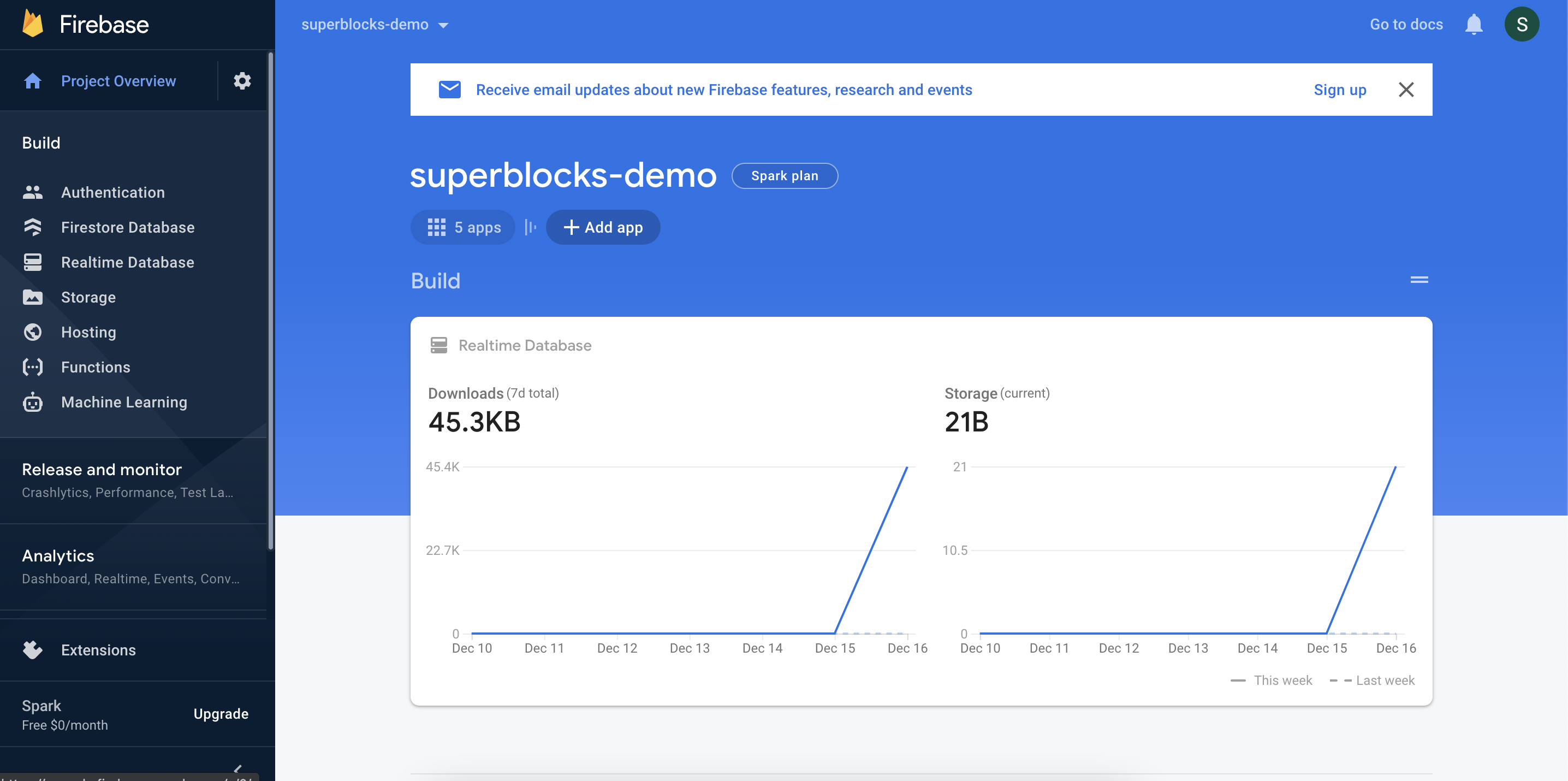 6. Name your new web app and click **Register app**
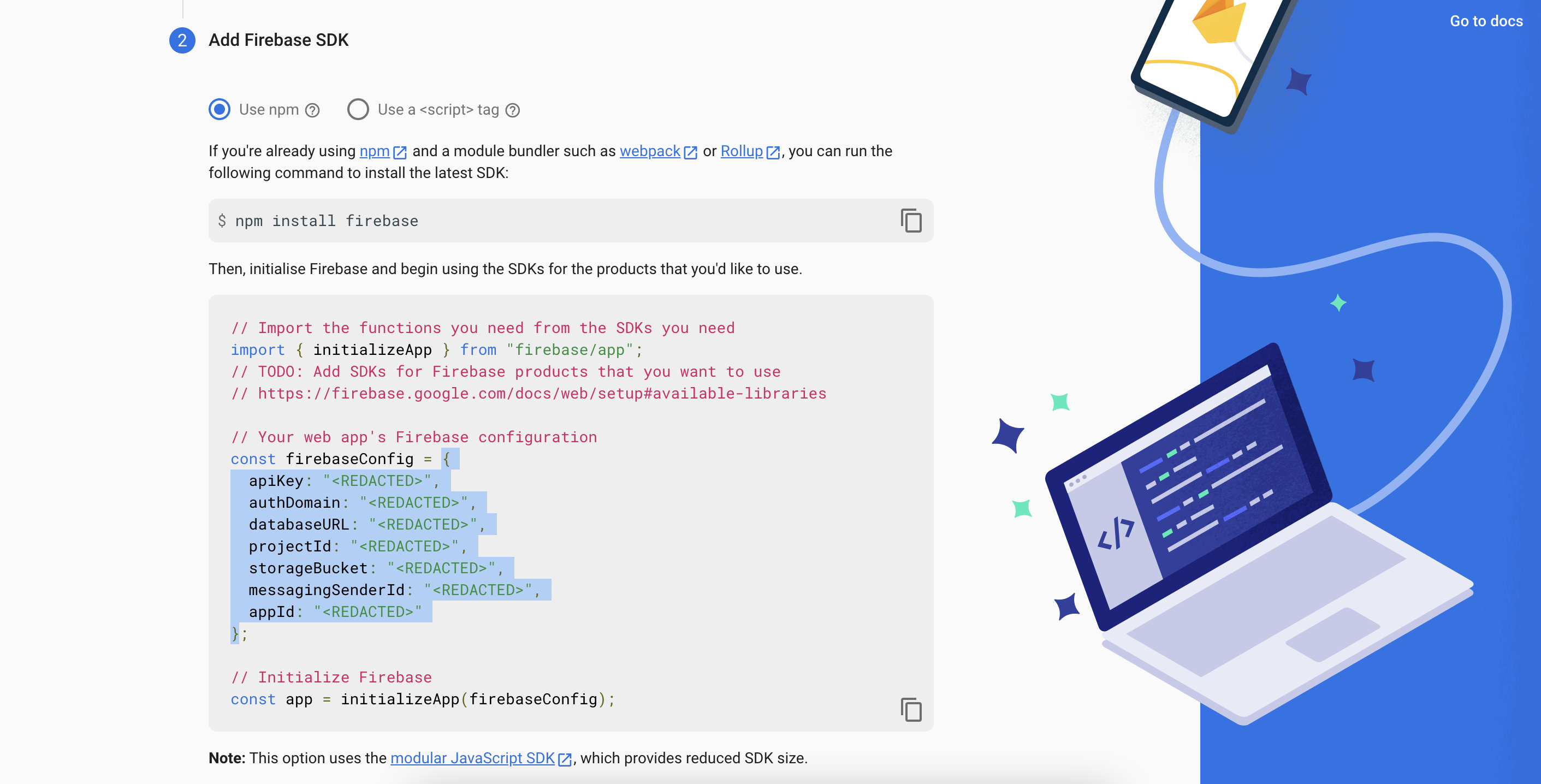
7. Copy the `firebaseConfig` object in the SDK code snippet. Make sure you **don't** copy the semicolon at the end of the line
6. Name your new web app and click **Register app**
7. Copy the `firebaseConfig` object in the SDK code snippet. Make sure you **don't** copy the semicolon at the end of the line
 ### Configure Integration
1. In the web app, navigate to the [Integrations](https://app.superblocks.com/integrations) page
2. Click into an existing REST integration, or create a new one
3. Select **Firebase** in the **Authentication method** dropdown
4. Paste the `firebaseConfig` object you copied previously into the **API config** field
5. Choose the sign-in methods you want to support
6. Use the [`firebase` object](#the-firebase-object) in **Headers** or **Params** to define how the firebase token will be used when calling your API. For example, to send the access token as an Authorization header, set:
### Configure Integration
1. In the web app, navigate to the [Integrations](https://app.superblocks.com/integrations) page
2. Click into an existing REST integration, or create a new one
3. Select **Firebase** in the **Authentication method** dropdown
4. Paste the `firebaseConfig` object you copied previously into the **API config** field
5. Choose the sign-in methods you want to support
6. Use the [`firebase` object](#the-firebase-object) in **Headers** or **Params** to define how the firebase token will be used when calling your API. For example, to send the access token as an Authorization header, set:
 Authentication with Firebase will be initiated in the user's browser when an API using this integration executes.
## The **`firebase`** object
The results of a Firebase exchange can be referenced in your integration configuration using the `firebase` object. The `firebase` object has the following properties.
| Property | Datatype | Description | Full Path |
| -------- | -------- | ------------------------------------------- | ---------------- |
| `token` | `STRING` | The access token returned by the OAuth flow | `firebase.token` |
## Token caching and refresh
This section includes specifics on how Firebase access tokens are handled. For more information on sessions management see our guide on [Credential & Session Management](/integrations/auth/credential-and-session-management)
### Cache location
After your Firebase authentication flow returns an access token, it is saved as an HTTP-Only Secure cookie in the user's browser. The token is cached in the browser since it is already exposed to the browser as a part of the authentication flow. The cookie cannot be accessed using JavaScript so is safe from exfiltration.
### Refreshing access tokens
Superblocks Firebase authentication does not support token refresh. Once the user's access token has expired, Superblocks will reprompt the user to log in.
Authentication with Firebase will be initiated in the user's browser when an API using this integration executes.
## The **`firebase`** object
The results of a Firebase exchange can be referenced in your integration configuration using the `firebase` object. The `firebase` object has the following properties.
| Property | Datatype | Description | Full Path |
| -------- | -------- | ------------------------------------------- | ---------------- |
| `token` | `STRING` | The access token returned by the OAuth flow | `firebase.token` |
## Token caching and refresh
This section includes specifics on how Firebase access tokens are handled. For more information on sessions management see our guide on [Credential & Session Management](/integrations/auth/credential-and-session-management)
### Cache location
After your Firebase authentication flow returns an access token, it is saved as an HTTP-Only Secure cookie in the user's browser. The token is cached in the browser since it is already exposed to the browser as a part of the authentication flow. The cookie cannot be accessed using JavaScript so is safe from exfiltration.
### Refreshing access tokens
Superblocks Firebase authentication does not support token refresh. Once the user's access token has expired, Superblocks will reprompt the user to log in.