;
};
When you embed a Superblocks app into your website, you have several options for authentication:
* **Public**: anyone can view your app, no login required
* **Private**: users log in to Superblocks directly and must have [`apps:view`](/admin/org-administration/resource-roles#applications) permission to the application
* **SSO**: use your application's existing login flow so users only have to log in once to access the embedded Superblocks app
**Public** and **Private** embeds have no added set up. Follow instructions below to configure **SSO**.
## SSO authentication flow
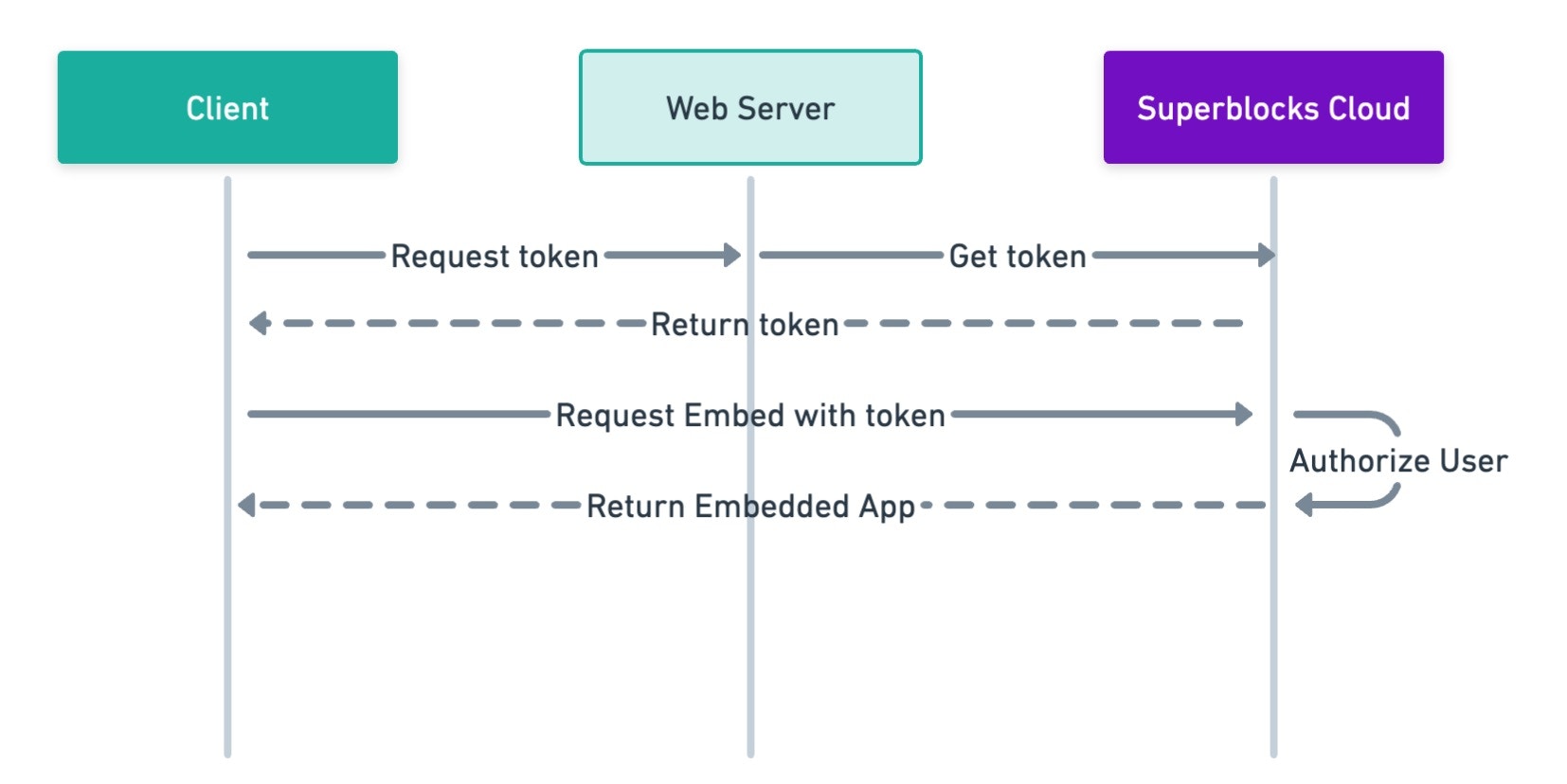
With **SSO** embedding, users access your embedded app without needing a separate Superblocks login. Instead, you'll log users in with your app's existing auth and issue them a Superblocks session token for embedded auth. Using the Superblocks session token, your user's identity, level of access, and metadata are securely transmitted to Superblocks so they can't be modified by users client-side.
The following diagram illustrates the authentication flow for SSO embed users:
## Set up embedded SSO
Use the following instructions to have your application authenticate users with Superblocks.
### Step 1. Generate an access token
Only organization Admins can create Embed access tokens.
To get Superblocks session tokens for your embed users, you'll need to create an **Embed** access token. Follow the instructions below to create an access token, or learn more about [Access tokens](/admin/org-administration/auth/access-tokens).
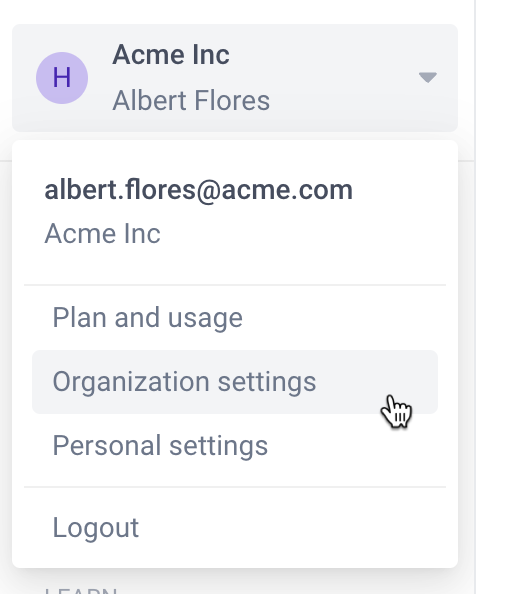
1. Click your avatar in the upper-left corner of the home page and click **Organization Settings**
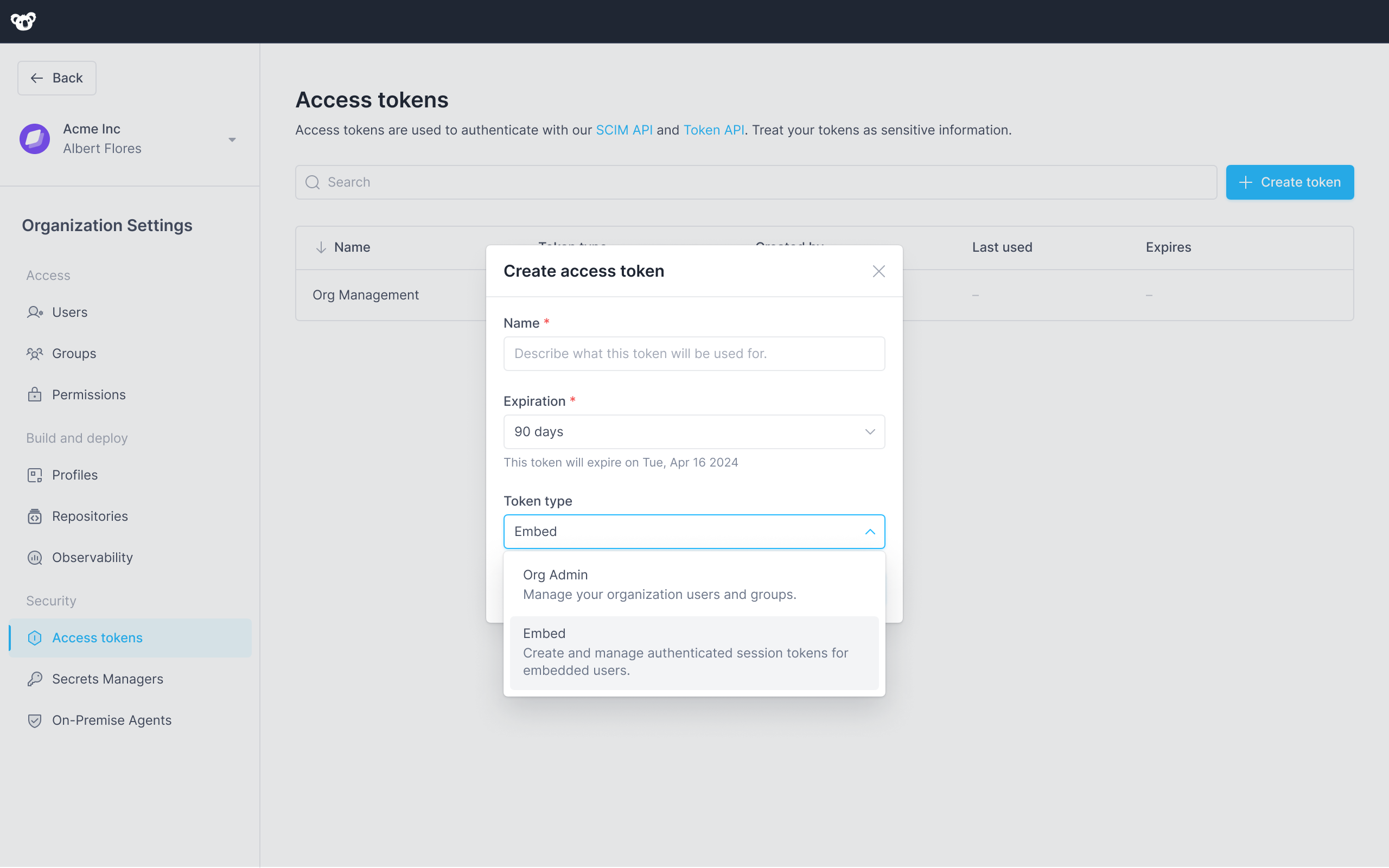
2. In the left sidebar, click **Access Tokens**
3. Click **+Create token**
4. In the **Name** field give your token a descriptive name
5. Select an **Expiration** date, or use the default 90 day expiration.
6. Select **Embed** as the token type
7. Click **Create**
Your access token is visible one time, immediately after you create it. If you leave or refresh the page where the token is displayed, it will be obscured and no longer visible. You must copy and store new access tokens somewhere secure before you leave the creation page, or you will lose access to the token.
### Step 2. Add token endpoint to your web-server
Add an endpoint to your web-server that requests user session tokens from Superblocks. You can add this as a new endpoint, or to your existing authentication flow.
```javascript server.js icon="js" theme={null}
// Get user session token from Superblocks API
app.get('/api/superblocks/token', checkAuthentication, async (req, res) => {
// Assuming getUser returns the currently authenticated user
const user = getUser(req);
const config = {
url: `https://app.superblocks.com/api/v1/public/token`,
method: 'post',
headers: {
'Authorization': `Bearer ${YOUR_ACCESS_TOKEN_HERE}`,
'Content-Type': 'application/json',
},
data: {
email: user.email,
name: `${user.firstName} ${user.lastName}`,
metadata: {
externalUserId: user.id,
externalOrgId: user.organization.id
}
}
};
// Call endpoint to request a Superblocks session token on-behalf-of the authenticated user
axios(config)
.then((response) => {
if (response.status === 200) {
res.json(response.data);
} else {
throw new Error('Could not authenticate user with Superblocks');
}
})
.catch((error) => {
res.status(401).json({ error: 'unathorized', message: error.message });
});
});
```
```python app.py icon="python" theme={null}
from flask import jsonify
import requests
@app.route('/api/superblocks/token', methods=['GET'])
def superblocks_auth():
# Assuming getUser() returns the currently authenticated user
user = getUser()
# Call /token endpoint to request a session on-behalf-of the authenticated user
response = requests.post(
"https://app.superblocks.com/api/v1/public/token",
headers={
'Authorization': f'Bearer {YOUR_ACCESS_TOKEN_HERE}',
'Content-Type': 'application/json'
},
json={
'email': user.email,
'name': f'{user.firstName} {user.lastName}',
'metadata': {
'externalUserId': user.id,
'externalOrgId': user.organization.id
}
}
)
if response.status_code == 200:
data = response.json()
return jsonify(data)
else:
return jsonify({
'error': 'unauthorized',
'error_description': 'Could not authenticate user with Superblocks'
}, 401)
```
```python views.py icon="python" theme={null}
from django.http import JsonResponse
from django.views import View
from django.contrib.auth.mixins import LoginRequiredMixin
import requests
class SuperblocksAuth(LoginRequiredMixin, View):
def get(self, request):
user = request.user
# Call /token endpoint to request a session on-behalf-of the authenticated user
response = requests.post(
"https://app.superblocks.com/api/v1/public/token",
headers={
'Authorization': f'Bearer {YOUR_ACCESS_TOKEN_HERE}',
'Content-Type': 'application/json'
},
json={
'email': user.email,
'name': f'{user.firstName} {user.lastName}',
'metadata': {
'externalUserId': user.id,
'exgernalOrgId': user.organization.id
}
}
)
if response.status_code == 200:
data = response.json()
return JsonResponse(data)
else:
return JsonResponse({
'error': 'unauthorized',
'error_description': 'Could not authenticate user with Superblocks'
}, status=401)
```
Make sure to replace the payload with information for the currently authenticated user.
Make sure your web server has CORS enabled if it's running on a different domain than your host application.
For a detailed explanation of the parameters, request format, and response format for the /token endpoint, please refer to the full API specification below.
### Step 3. Request token client-side
Add code to your web application to request a session token from the token endpoint you just added to your application's web server.
```tsx src/utils.tsx icon="react" theme={null}
export const getSBToken = () => {
return fetch(`https://${YOUR_API_DOMAIN}/api/superblocks/token`).then(
res => res.json()
).then(
data => data.access_token
).catch(
err => {
throw new Error('Superblocks Auth Error');
}
);
}
```
```js src/utils.js icon="js" theme={null}
function getSBToken () {
return fetch(`https://${YOUR_API_DOMAIN}/api/superblocks/token`).then(
res => res.json()
).then(
data => data.access_token
).catch(
err => {
throw new Error('Superblocks Auth Error');
}
);
}
```
### Step 4. Pass the token to your embed
```tsx src/views/embed_page.tsx icon="react" theme={null}
import React, { useState, useEffect } from 'react';
import { SuperblocksEmbed } from '@superblocksteam/embed-react';
import { getSBToken } from '../utils';
const PageWithEmbed = () => {
const [token, setToken] = useState(null);
useEffect(() => {
getSBToken()
.then((token) => setToken(token))
.catch(err => console.log('Failed to get Superblocks auth token'));
}, []);
const handleFailedAuth = (err) => {
console.log('Superblocks auth token invalid');
}
return <>
{ token ?
:
Loading...
}
;
}
```
```html src/pages/embed_page.html icon="js" theme={null}
```
## Manage user access
Embed users must have the [`apps:view`](/admin/org-administration/resource-roles#applications) permission to the Superblocks app they're trying to access.
Grant users access by associating them with a [**Group**](/admin/org-administration/groups) with the necessary access level. To associate an embed user with a group:
1. Click your avatar in the upper-left corner of the home page
2. In the menu, click **Organization Settings**
3. In the left sidebar, click **Groups**
4. Either select **+ Add group** or click into an existing group
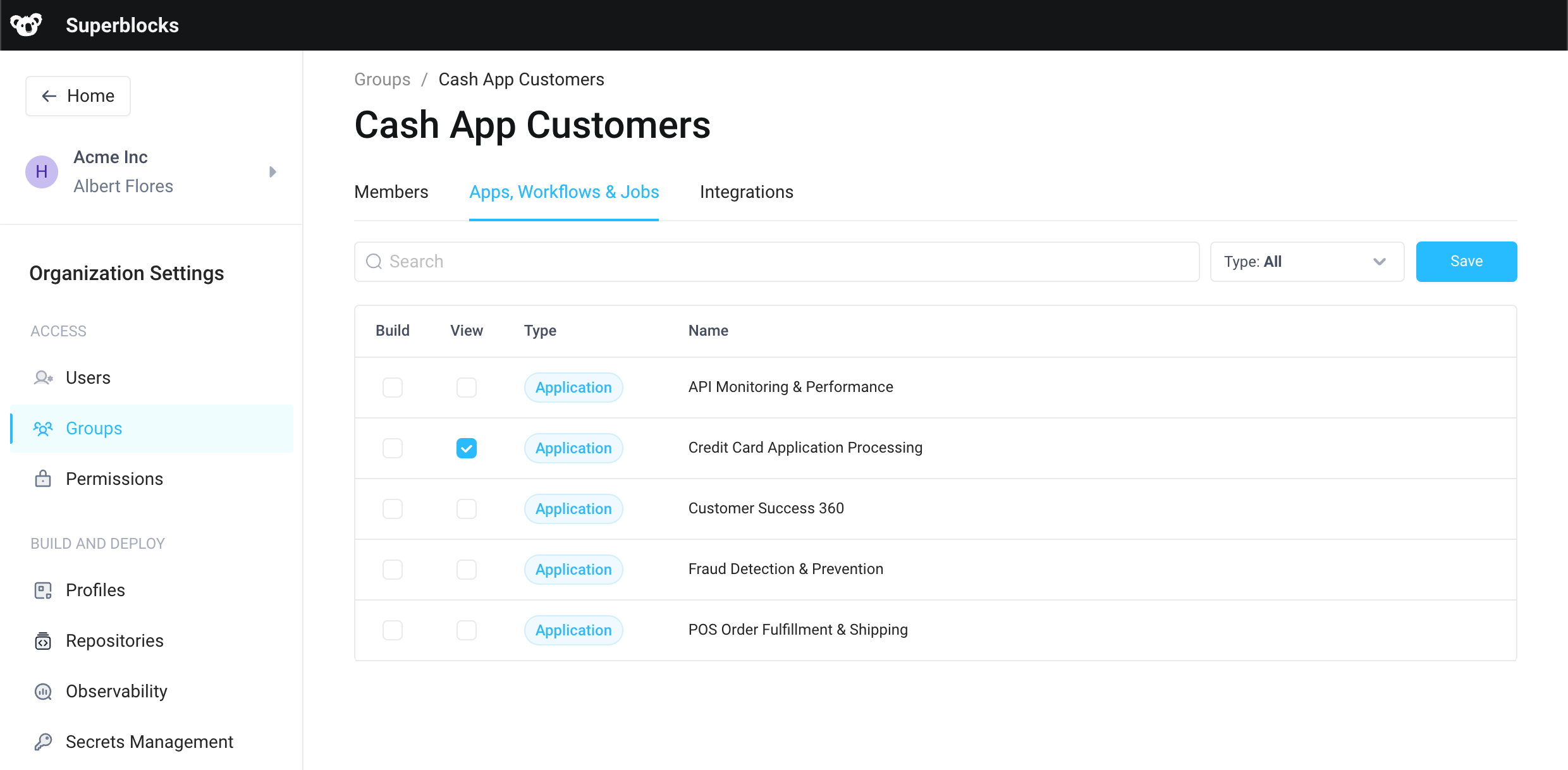
5. On the **Permissions** tab, enable **View** access for apps you want the user(s) to have access to
6. Go back to the **Groups** page and copy the group's ID by selecting **...** → **Copy group ID**
7. Update your [server endpoint](#step-2-add-token-endpoint-to-your-web-server) by adding a list of `groupIds` you want users to be associated with
```jsx theme={null}
fetch("https://app.superblocks.com/api/v1/public/token", {
...
body: JSON.stringify({
'email': user.email,
'name': `${user.firstName} ${user.lastName}`,
// Superblocks Group IDs which grant view access to apps embedded in this website
'groupIds': [
'cc07e026-02c7-4ab5-b33b-232d57e7c804'
]
})
});
```
```python theme={null}
response = requests.post(
"https://app.superblocks.com/api/v1/public/token",
...
json={
'email': user.email,
'name': f'{user.firstName} {user.lastName}',
# Superblocks Group IDs which grant view access to apps embedded in this website
'groupIds': [
'cc07e026-02c7-4ab5-b33b-232d57e7c804'
]
}
)
```
```python theme={null}
# Call /token endpoint to request a session on-behalf-of the authenticated user
response = requests.post(
"https://app.superblocks.com/api/v1/public/token",
...
json={
'email': user.email,
'name': f'{user.firstName} {user.lastName}',
# Superblocks Group IDs which grant view access to apps embedded in this website
'groupIds': [
'cc07e026-02c7-4ab5-b33b-232d57e7c804'
]
}
)
```
Embed users aren't permanent members of groups and won't show up on the **Members** tab of groups. They are associated with the group for permissions purposes for the duration of the token's session.
## Customize user metadata
User metadata lets you attach additional information to a user beyond the standard attributes. This can be useful for storing extra data relevant to your application or business logic.
To customize user metadata, include a `metadata` field in your request payload with JSON representing the metadata you want to add. For example:
```jsx theme={null}
fetch("https://app.superblocks.com/api/v1/public/token", {
method: 'POST',
...
body: JSON.stringify({
'email': user.email,
'name': `${user.firstName} ${user.lastName}`,
'metadata': {
'externalUserId': user.id,
'externalOrgId': user.organization.id,
// Additional user metadata to customize app behavior
'isAdmin': user.roles.includes('Admin')
}
})
});
```
```python theme={null}
response = requests.post(
"https://app.superblocks.com/api/v1/public/token",
...
json={
'email': user.email,
'name': f'{user.firstName} {user.lastName}',
'metadata': {
'externalUserId': user.id,
'externalOrgId': user.organization.id,
# Additional user metadata to customize app behavior
'isAdmin': 'Admin' in user.roles
}
}
)
```
```python theme={null}
# Call /token endpoint to request a session on-behalf-of the authenticated user
response = requests.post(
"https://app.superblocks.com/api/v1/public/token",
...
json={
'email': user.Email,
'name': f'{user.firstName} {user.lastName}',
'metadata': {
'externalUserId': user.id,
'externalOrgId': user.organization.id
# Additional user metadata to customize app behavior
'isAdmin': 'Admin' in user.roles
}
}
)
```
Metadata is associated with the user's current session and encoded in the session JWT as custom claims. This ensures that the metadata cannot be modified client-side, providing an additional layer of protection against unauthorized tampering.
You can [prompt Clark](/building-with-clark) to build any conditional logic based on this user metadata. For example, display, hide, or disable a certain component based on an `isAdmin` metadata attribute
Under the hood, Clark leverages the `useSuperblocksUser()` function to get the logged in user and check their metadata. Here is the code generated from the prompt above.
```tsx index.tsx icon="react" theme={null}
import { useSuperblocksUser } from "@superblocksteam/library";
import { Button } from "@/components/ui/button";
import { Icon } from "@/components/ui/icon";
import { Tooltip } from "@/components/ui/tooltip";
export default function Page1Component() {
const user = useSuperblocksUser();
const isAdmin = user?.metadata?.isAdmin === true;
const deleteButton = (
);
return (
{isAdmin ? (
deleteButton
) : (
{deleteButton}
)}
);
}
```
If you prefer to edit and review this logic directly, see [developing apps in code](/building-with-clark/developing-apps-in-code).
## Token API specification
#### POST `/api/v1/public/token`
Use this endpoint to request a session token for an embedded user.
**Request parameters**
`application/json`
| Parameter | Required | Type | Description |
| -------------------- | -------- | ------- | -------------------------------------------------------------------------------------------------------------------------------------------------------------------------------------------------------------------------------------------------------------------- |
| `email` | ✓ | String | The user's email address, which uniquely identifies them in Superblocks. |
| `name` | | String | The user's full display name. |
| `groupIds` | | Array | Superblocks Group IDs to associate the embed user with. |
| `metadata` | | Object | Object containing additional metadata about the user. |
| `isSuperblocksUser` | | Boolean | If `TRUE`, the token will be associated with the Superblocks platform user with the email specified. If no platform user exists with that email, the user will get an Unauthorized error. |
| `subject_token_type` | | String | The type of token being passed in `subject_token`. Required when using `subject_token`. Must be set to `urn:ietf:params:oauth:token-type:access_token`. See [On-Behalf-Of Token Exchange](/integrations/auth/oauth-20#on-behalf-of-token-exchange) for more details. |
| `subject_token` | | String | An access token from an external identity provider (e.g., Okta, Auth0, your web server) that will be used in OAuth2.0 Token Exchange auth flows. See [On-Behalf-Of Token Exchange](/integrations/auth/oauth-20#on-behalf-of-token-exchange) for more details. |
```bash theme={null}
curl --request POST
--url 'https://{REGION}.superblocks.com/api/v1/public/token' \
--header 'authorization: Bearer {YOUR_ACCESS_TOKEN_HERE}' \
--header 'content-type: application/json' \
--data-raw '{
"email":"jane.wind@company.com",
"name": "Jane Wind",
"metadata": {
"externalUserId": "d942c6...72f362",
"externalOrgId": "c32979...acf711"
}
}'
```
```jsx theme={null}
const axios = require('axios');
const config = {
url: `https://${REGION}.superblocks.com/api/v1/public/token`,
method: 'post',
headers: {
'Authorization': `Bearer ${YOUR_ACCESS_TOKEN_HERE}`,
'Content-Type': 'application/json',
},
data: {
"email": "jane.wind@company.com",
"name": "Jane Wind",
"metadata": {
"externalUserId": "d942c6...72f362",
"externalOrgId": "c32979...acf711"
}
}
};
axios(config)
.then((response) => {
if (response.status === 200) {
res.json(response.data);
} else {
throw new Error('Could not authenticate user with Superblocks');
}
})
.catch((error) => {
res.status(401).json({ error: 'unathorized', message: error.message });
});
```
```python theme={null}
import requests
import json
url = "https://{REGION}.superblocks.com/api/v1/public/token"
payload = {
"email": "jane.wind@company.com",
"name": "Jane Wind",
"metadata": {
"externalUserId": "d942c6...72f362",
"externalOrgId": "c32979...acf711"
}
}
headers = {
'authorization': 'Bearer {YOUR_ACCESS_TOKEN_HERE}',
'content-type': 'application/json'
}
response = requests.request("POST", url, headers=headers, json=payload)
print(response.text)
```
**Response Sample**
```json theme={null}
HTTP/1.1 200 OK
Content-Type: application/json
{
"access_token":"eyJz93a...k4laUWw",
"token_type":"Bearer",
"expires_in":86400
}
```
 7. Click **Create**
 6. Go back to the **Groups** page and copy the group's ID by selecting **...** → **Copy group ID**
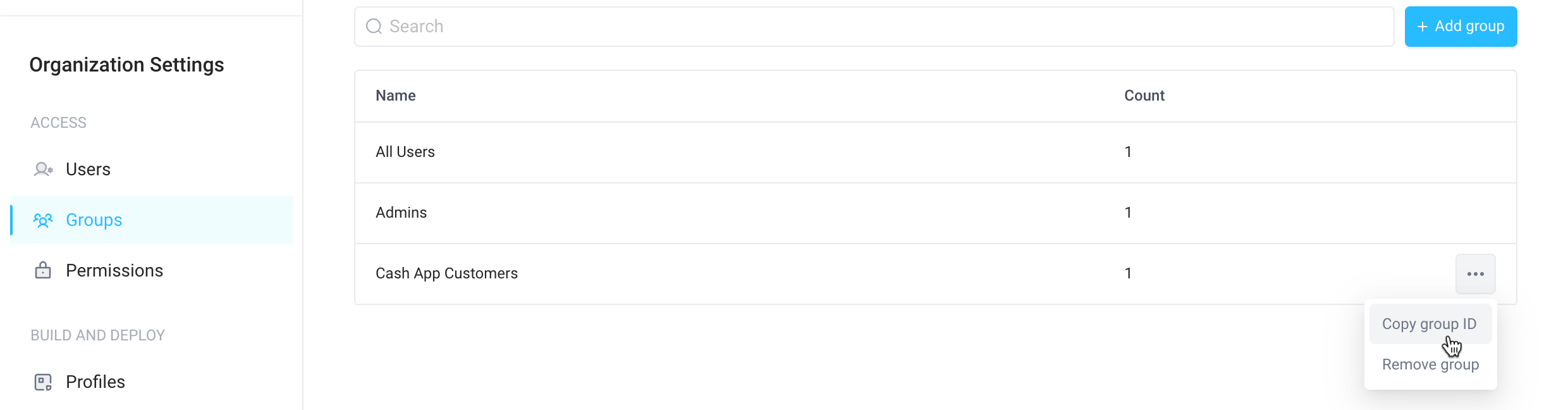 7. Update your [server endpoint](#step-2-add-token-endpoint-to-your-web-server) by adding a list of `groupIds` you want users to be associated with
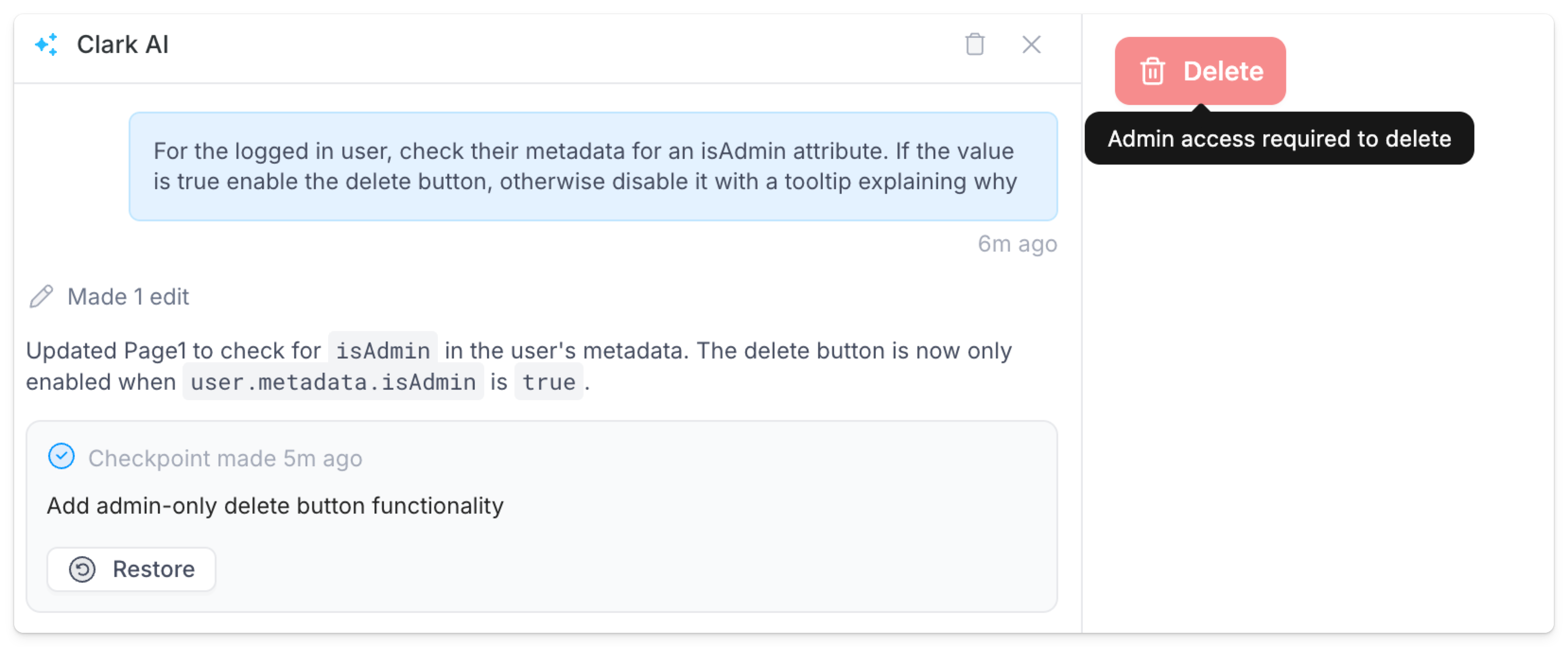 Under the hood, Clark leverages the `useSuperblocksUser()` function to get the logged in user and check their metadata. Here is the code generated from the prompt above.
```tsx index.tsx icon="react" theme={null}
import { useSuperblocksUser } from "@superblocksteam/library";
import { Button } from "@/components/ui/button";
import { Icon } from "@/components/ui/icon";
import { Tooltip } from "@/components/ui/tooltip";
export default function Page1Component() {
const user = useSuperblocksUser();
const isAdmin = user?.metadata?.isAdmin === true;
const deleteButton = (
);
return (
Under the hood, Clark leverages the `useSuperblocksUser()` function to get the logged in user and check their metadata. Here is the code generated from the prompt above.
```tsx index.tsx icon="react" theme={null}
import { useSuperblocksUser } from "@superblocksteam/library";
import { Button } from "@/components/ui/button";
import { Icon } from "@/components/ui/icon";
import { Tooltip } from "@/components/ui/tooltip";
export default function Page1Component() {
const user = useSuperblocksUser();
const isAdmin = user?.metadata?.isAdmin === true;
const deleteButton = (
);
return (