> ## Documentation Index
> Fetch the complete documentation index at: https://docs.superblocks.com/llms.txt
> Use this file to discover all available pages before exploring further.
# Secure credential management
> Securely store and access credentials using data plane environment variables
export const Alert = ({type, title, children}) => {
const getIcon = () => {
switch (type) {
case 'info':
return "data:image/svg+xml,%3Csvg xmlns='http://www.w3.org/2000/svg' width='20' height='20' viewBox='0 0 20 20' fill='none'%3E%3Cpath d='M10 0C4.477 0 0 4.477 0 10s4.477 10 10 10 10-4.477 10-10S15.523 0 10 0zm0 15c-.552 0-1-.448-1-1s.448-1 1-1 1 .448 1 1-.448 1-1 1zm1-3H9V6h2v6z' fill='%230099FF'/%3E%3C/svg%3E";
case 'success':
return "data:image/svg+xml,%3Csvg width='20' height='20' viewBox='0 0 20 20' fill='none' xmlns='http://www.w3.org/2000/svg'%3E%3Cpath fill-rule='evenodd' clip-rule='evenodd' d='M10 0C4.477 0 0 4.477 0 10s4.477 10 10 10 10-4.477 10-10S15.523 0 10 0zm4.293 6.293L9 11.586 5.707 8.293c-.391-.391-1.024-.391-1.414 0s-.391 1.024 0 1.414l4 4c.391.391 1.024.391 1.414 0l6-6c.391-.391.391-1.024 0-1.414s-1.024-.391-1.414 0z' fill='%230CC26D'/%3E%3C/svg%3E";
case 'warning':
return "data:image/svg+xml;charset=utf-8;base64,PHN2ZyB4bWxucz0naHR0cDovL3d3dy53My5vcmcvMjAwMC9zdmcnIHhtbDpzcGFjZT0ncHJlc2VydmUnIHdpZHRoPScxMDgwJyBoZWlnaHQ9JzEwODAnPjxyZWN0IHdpZHRoPScxMDAlJyBoZWlnaHQ9JzEwMCUnIGZpbGw9J3RyYW5zcGFyZW50Jy8+PHBhdGggZD0nTTEzLjc5NCAxMC43NSA4LjMgMS4yNWExLjUgMS41IDAgMCAwLTIuNiAwbC01LjQ5NCA5LjVBMS40OTQgMS40OTQgMCAwIDAgMS41IDEzaDExYTEuNDkzIDEuNDkzIDAgMCAwIDEuMjk0LTIuMjVNNi41IDUuNWEuNS41IDAgMCAxIDEgMFY4YS41LjUgMCAwIDEtMSAwek03IDExYS43NS43NSAwIDEgMSAwLTEuNS43NS43NSAwIDAgMSAwIDEuNScgc3R5bGU9J3N0cm9rZTpub25lO3N0cm9rZS13aWR0aDoxO3N0cm9rZS1kYXNoYXJyYXk6bm9uZTtzdHJva2UtbGluZWNhcDpidXR0O3N0cm9rZS1kYXNob2Zmc2V0OjA7c3Ryb2tlLWxpbmVqb2luOm1pdGVyO3N0cm9rZS1taXRlcmxpbWl0OjQ7ZmlsbDojZmY5ZjM1O2ZpbGwtcnVsZTpub256ZXJvO29wYWNpdHk6MScgdHJhbnNmb3JtPSd0cmFuc2xhdGUoLjAyIDE5LjMwNSlzY2FsZSg3Ny4xNCknLz48L3N2Zz4=";
case 'danger':
return "data:image/svg+xml,%3Csvg width='20' height='20' viewBox='0 0 20 20' fill='none' xmlns='http://www.w3.org/2000/svg'%3E%3Cpath d='M10 0C4.477 0 0 4.477 0 10s4.477 10 10 10 10-4.477 10-10S15.523 0 10 0zm5.707 4.293L10 9.586 4.293 4.293c-.391-.391-1.024-.391-1.414 0s-.391 1.024 0 1.414L8.586 11l-5.707 5.293c-.391.391-.391 1.024 0 1.414s1.024.391 1.414 0L10 12.414l5.707 5.293c.391.391 1.024.391 1.414 0s.391-1.024 0-1.414L11.414 11l5.707-5.293c.391-.391.391-1.024 0-1.414s-1.024-.391-1.414 0z' fill='%23F45252'/%3E%3C/svg%3E";
case 'note':
return "data:image/svg+xml,%3Csvg xmlns='http://www.w3.org/2000/svg' width='20' height='20' viewBox='0 0 20 20' fill='none'%3E%3Cpath d='M10 0C4.477 0 0 4.477 0 10s4.477 10 10 10 10-4.477 10-10S15.523 0 10 0zm0 15c-.552 0-1-.448-1-1s.448-1 1-1 1 .448 1 1-.448 1-1 1zm1-3H9V6h2v6z' fill='%230099FF'/%3E%3C/svg%3E";
default:
return "";
}
};
return
{title &&
{title}
}
{children}
;
};
When [self-hosting the Superblocks data plane](/enterprise/hybrid-architecture/overview), you can store credentials as environment variables, enabling you to manage secrets securely within your own infrastructure. Environment variables prefixed with `SUPERBLOCKS_AGENT_APP_ENV_` can be referenced using the global `Env` object.
## Benefits
* **Enhanced security**: Credentials remain within your infrastructure and are never stored in or transmitted through Superblocks Cloud
* **Full control**: Manage credentials using your existing secrets management tools and processes (e.g., AWS Secrets Manager, HashiCorp Vault, Kubernetes Secrets)
* **Simplified rotation**: Update credentials in your deployment without modifying Superblocks configurations
* **Compliance**: Meet security and compliance requirements by keeping sensitive data in your controlled environment
## Environment variable prefix (`SUPERBLOCKS_AGENT_APP_ENV_`)
All environment variables that are prefixed with `SUPERBLOCKS_AGENT_APP_ENV_` are accessible through the `Env` global variable. You can use them in Superblocks with the environment variable name without the prefix (e.g. `Env.postgres_password`). To use:
1. Specify environment variables prefixed with `SUPERBLOCKS_AGENT_APP_ENV_` (e.g. `SUPERBLOCKS_AGENT_APP_ENV_POSTGRES_PASSWORD`) in the environment where the data plane is deployed
2. Reference the environment variable insider Superblocks as a property on the global `Env` object by the suffix of the environment variable (e.g. `{{Env.postgres_password}}` for the example above)
The global \{\{Env}} variable can be accessed on the integration page or when defining API steps.
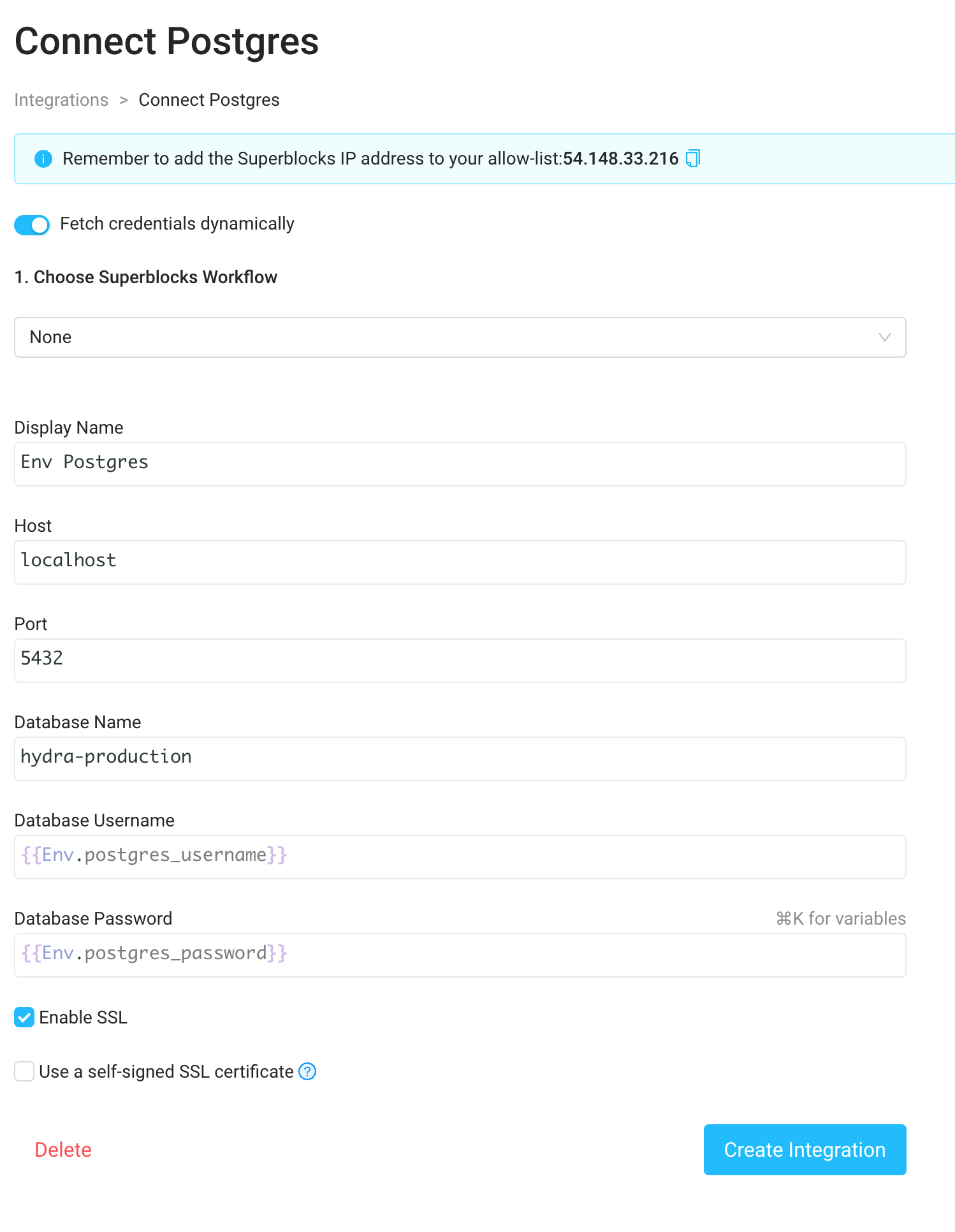
### Example: Configuring a Postgres integration with environment variable secrets
1. Expose the environment variables `SUPERBLOCKS_AGENT_APP_ENV_POSTGRES_USERNAME` and `SUPERBLOCKS_AGENT_APP_ENV_POSTGRES_PASSWORD` in your data plane deployment
2. Navigate to the [Integrations](https://app.superblocks.com/integrations) tab in the menu bar on the left side of the Home page and select a [Postgres](https://app.superblocks.com/integrations/postgres) integration
3. Enable "Fetch credentials dynamically" via the toggle at the top of the Postgres integration form
4. Enter the username and password as `{{Env.postgres_username}}` and `{{Env.postgres_password}}`.
## Integrating with secret managers
You can combine data plane environment variables with your existing secrets management infrastructure. Here are common patterns:
### AWS Secrets Manager / Parameter Store
When deploying on AWS (ECS, EKS, etc.), inject secrets from AWS Secrets Manager or Parameter Store into your data plane container as environment variables at runtime.
### HashiCorp Vault
Use Vault Agent or the Vault Secrets Operator (for Kubernetes) to inject secrets as environment variables into your data plane deployment.
### Kubernetes Secrets
Reference Kubernetes Secrets in your deployment manifest to inject credentials as environment variables.
### Azure Key Vault / Google Secret Manager
Use your cloud provider's native secrets integration to inject secrets into your container environment.