> ## Documentation Index
> Fetch the complete documentation index at: https://docs.superblocks.com/llms.txt
> Use this file to discover all available pages before exploring further.
# Virtual machine
> Estimated deployment time: 10 minutes
export const Alert = ({type, title, children}) => {
const getIcon = () => {
switch (type) {
case 'info':
return "data:image/svg+xml,%3Csvg xmlns='http://www.w3.org/2000/svg' width='20' height='20' viewBox='0 0 20 20' fill='none'%3E%3Cpath d='M10 0C4.477 0 0 4.477 0 10s4.477 10 10 10 10-4.477 10-10S15.523 0 10 0zm0 15c-.552 0-1-.448-1-1s.448-1 1-1 1 .448 1 1-.448 1-1 1zm1-3H9V6h2v6z' fill='%230099FF'/%3E%3C/svg%3E";
case 'success':
return "data:image/svg+xml,%3Csvg width='20' height='20' viewBox='0 0 20 20' fill='none' xmlns='http://www.w3.org/2000/svg'%3E%3Cpath fill-rule='evenodd' clip-rule='evenodd' d='M10 0C4.477 0 0 4.477 0 10s4.477 10 10 10 10-4.477 10-10S15.523 0 10 0zm4.293 6.293L9 11.586 5.707 8.293c-.391-.391-1.024-.391-1.414 0s-.391 1.024 0 1.414l4 4c.391.391 1.024.391 1.414 0l6-6c.391-.391.391-1.024 0-1.414s-1.024-.391-1.414 0z' fill='%230CC26D'/%3E%3C/svg%3E";
case 'warning':
return "data:image/svg+xml;charset=utf-8;base64,PHN2ZyB4bWxucz0naHR0cDovL3d3dy53My5vcmcvMjAwMC9zdmcnIHhtbDpzcGFjZT0ncHJlc2VydmUnIHdpZHRoPScxMDgwJyBoZWlnaHQ9JzEwODAnPjxyZWN0IHdpZHRoPScxMDAlJyBoZWlnaHQ9JzEwMCUnIGZpbGw9J3RyYW5zcGFyZW50Jy8+PHBhdGggZD0nTTEzLjc5NCAxMC43NSA4LjMgMS4yNWExLjUgMS41IDAgMCAwLTIuNiAwbC01LjQ5NCA5LjVBMS40OTQgMS40OTQgMCAwIDAgMS41IDEzaDExYTEuNDkzIDEuNDkzIDAgMCAwIDEuMjk0LTIuMjVNNi41IDUuNWEuNS41IDAgMCAxIDEgMFY4YS41LjUgMCAwIDEtMSAwek03IDExYS43NS43NSAwIDEgMSAwLTEuNS43NS43NSAwIDAgMSAwIDEuNScgc3R5bGU9J3N0cm9rZTpub25lO3N0cm9rZS13aWR0aDoxO3N0cm9rZS1kYXNoYXJyYXk6bm9uZTtzdHJva2UtbGluZWNhcDpidXR0O3N0cm9rZS1kYXNob2Zmc2V0OjA7c3Ryb2tlLWxpbmVqb2luOm1pdGVyO3N0cm9rZS1taXRlcmxpbWl0OjQ7ZmlsbDojZmY5ZjM1O2ZpbGwtcnVsZTpub256ZXJvO29wYWNpdHk6MScgdHJhbnNmb3JtPSd0cmFuc2xhdGUoLjAyIDE5LjMwNSlzY2FsZSg3Ny4xNCknLz48L3N2Zz4=";
case 'danger':
return "data:image/svg+xml,%3Csvg width='20' height='20' viewBox='0 0 20 20' fill='none' xmlns='http://www.w3.org/2000/svg'%3E%3Cpath d='M10 0C4.477 0 0 4.477 0 10s4.477 10 10 10 10-4.477 10-10S15.523 0 10 0zm5.707 4.293L10 9.586 4.293 4.293c-.391-.391-1.024-.391-1.414 0s-.391 1.024 0 1.414L8.586 11l-5.707 5.293c-.391.391-.391 1.024 0 1.414s1.024.391 1.414 0L10 12.414l5.707 5.293c.391.391 1.024.391 1.414 0s.391-1.024 0-1.414L11.414 11l5.707-5.293c.391-.391.391-1.024 0-1.414s-1.024-.391-1.414 0z' fill='%23F45252'/%3E%3C/svg%3E";
case 'note':
return "data:image/svg+xml,%3Csvg xmlns='http://www.w3.org/2000/svg' width='20' height='20' viewBox='0 0 20 20' fill='none'%3E%3Cpath d='M10 0C4.477 0 0 4.477 0 10s4.477 10 10 10 10-4.477 10-10S15.523 0 10 0zm0 15c-.552 0-1-.448-1-1s.448-1 1-1 1 .448 1 1-.448 1-1 1zm1-3H9V6h2v6z' fill='%230099FF'/%3E%3C/svg%3E";
default:
return "";
}
};
return
{title &&
{title}
}
{children}
;
};
The Superblocks data plane can be deployed on a virtual machine with Docker Compose. Note, this method is not as scalable as using container management services like [AWS ECS Fargate](./aws_ecs_fargate) or [Google Cloud Run](./google_cloud_run). If you use this method in production, we recommend deploying on a minimum of 3 instances.
## Deploy
Follow the steps below to deploy the data plane on a virtual machine.
### Launch VM
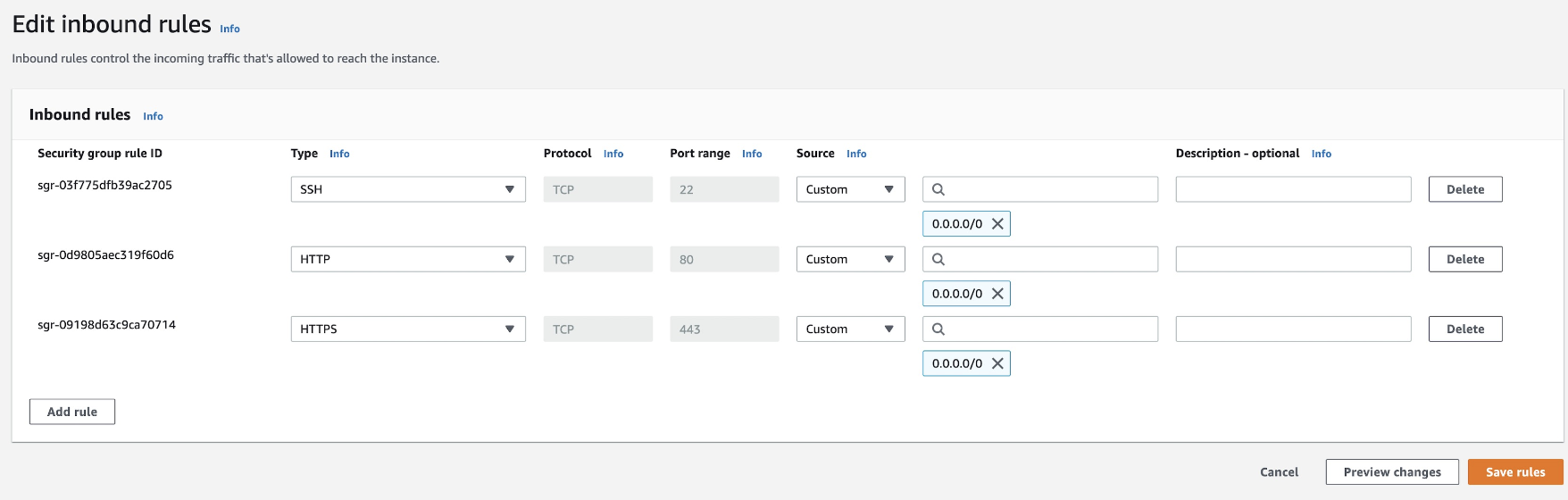
Launch a virtual machine using Amazon Linux, Ubuntu, CentOS, or Debian. The instance should have at least 4 GiB of memory and 20 GiB of storage. Make sure the instance's security group allows inbound traffic on HTTP port 80 and HTTPS port 443. Example below for an AWS EC2 instance.
 ### Create CNAME or A record
Next, create a CNAME or A record of a custom domain pointed to the IP address of the VM. This custom domain will be used in the agent configuration.
### Install agent
**1. Download script on VM**
```bash theme={null}
sudo curl -SL https://charts.superblocks.com/agent/quickstart.sh -o /usr/bin/superblocks
sudo chmod +x /usr/bin/superblocks
```
**2. Configure agent variables**
To generate a
### Create CNAME or A record
Next, create a CNAME or A record of a custom domain pointed to the IP address of the VM. This custom domain will be used in the agent configuration.
### Install agent
**1. Download script on VM**
```bash theme={null}
sudo curl -SL https://charts.superblocks.com/agent/quickstart.sh -o /usr/bin/superblocks
sudo chmod +x /usr/bin/superblocks
```
**2. Configure agent variables**
To generate a SUPERBLOCKS\_AGENT\_KEY, go to the Superblocks Setup Wizard.
```bash theme={null}
sudo superblocks conf SUPERBLOCKS_AGENT_KEY [YOUR_AGENT_KEY]
sudo superblocks conf SUPERBLOCKS_LETSENCRYPT_EMAIL [YOUR_EMAIL_ADDRESS]
sudo superblocks conf SUPERBLOCKS_AGENT_HOST_URL https://YOUR.VALID.DOMAIN.COM
sudo superblocks conf SUPERBLOCKS_PROXY_REPLICA_COUNT 1
sudo superblocks conf SUPERBLOCKS_DOCKER_AGENT_TAG latest
```
Note, `SUPERBLOCKS_AGENT_HOST_URL` is the custom domain configured under prerequisites.
If you use the EU Superblocks instance, set SUPERBLOCKS\_AGENT\_DATA\_DOMAIN to eu.superblocks.com.
**3. Start the service**
When starting for the first time, this will install docker and pull docker images.
```bash theme={null}
sudo superblocks start
```
**4. Verify**
After the installation completes, check that the service is successfully deployed and can be connected to locally.
```bash theme={null}
curl localhost:8080/health
```
To validate that the service is up and available over https, visit `https://YOUR.VALID.DOMAIN.COM/health`.
## Billable services
When running the data plane on a virtual machine, it is important to be aware of your cloud provider's instance pricing (i.e. [EC2](https://aws.amazon.com/ec2/pricing/), [GCE](https://cloud.google.com/compute/all-pricing), [Azure VM](https://azure.microsoft.com/en-us/pricing/details/virtual-machines/series/)) and the cost of any associated infrastructure like networking, load balancers, and DNS.
