> ## Documentation Index
> Fetch the complete documentation index at: https://docs.superblocks.com/llms.txt
> Use this file to discover all available pages before exploring further.
# Superblocks SDLC
export const Alert = ({type, title, children}) => {
const getIcon = () => {
switch (type) {
case 'info':
return "data:image/svg+xml,%3Csvg xmlns='http://www.w3.org/2000/svg' width='20' height='20' viewBox='0 0 20 20' fill='none'%3E%3Cpath d='M10 0C4.477 0 0 4.477 0 10s4.477 10 10 10 10-4.477 10-10S15.523 0 10 0zm0 15c-.552 0-1-.448-1-1s.448-1 1-1 1 .448 1 1-.448 1-1 1zm1-3H9V6h2v6z' fill='%230099FF'/%3E%3C/svg%3E";
case 'success':
return "data:image/svg+xml,%3Csvg width='20' height='20' viewBox='0 0 20 20' fill='none' xmlns='http://www.w3.org/2000/svg'%3E%3Cpath fill-rule='evenodd' clip-rule='evenodd' d='M10 0C4.477 0 0 4.477 0 10s4.477 10 10 10 10-4.477 10-10S15.523 0 10 0zm4.293 6.293L9 11.586 5.707 8.293c-.391-.391-1.024-.391-1.414 0s-.391 1.024 0 1.414l4 4c.391.391 1.024.391 1.414 0l6-6c.391-.391.391-1.024 0-1.414s-1.024-.391-1.414 0z' fill='%230CC26D'/%3E%3C/svg%3E";
case 'warning':
return "data:image/svg+xml;charset=utf-8;base64,PHN2ZyB4bWxucz0naHR0cDovL3d3dy53My5vcmcvMjAwMC9zdmcnIHhtbDpzcGFjZT0ncHJlc2VydmUnIHdpZHRoPScxMDgwJyBoZWlnaHQ9JzEwODAnPjxyZWN0IHdpZHRoPScxMDAlJyBoZWlnaHQ9JzEwMCUnIGZpbGw9J3RyYW5zcGFyZW50Jy8+PHBhdGggZD0nTTEzLjc5NCAxMC43NSA4LjMgMS4yNWExLjUgMS41IDAgMCAwLTIuNiAwbC01LjQ5NCA5LjVBMS40OTQgMS40OTQgMCAwIDAgMS41IDEzaDExYTEuNDkzIDEuNDkzIDAgMCAwIDEuMjk0LTIuMjVNNi41IDUuNWEuNS41IDAgMCAxIDEgMFY4YS41LjUgMCAwIDEtMSAwek03IDExYS43NS43NSAwIDEgMSAwLTEuNS43NS43NSAwIDAgMSAwIDEuNScgc3R5bGU9J3N0cm9rZTpub25lO3N0cm9rZS13aWR0aDoxO3N0cm9rZS1kYXNoYXJyYXk6bm9uZTtzdHJva2UtbGluZWNhcDpidXR0O3N0cm9rZS1kYXNob2Zmc2V0OjA7c3Ryb2tlLWxpbmVqb2luOm1pdGVyO3N0cm9rZS1taXRlcmxpbWl0OjQ7ZmlsbDojZmY5ZjM1O2ZpbGwtcnVsZTpub256ZXJvO29wYWNpdHk6MScgdHJhbnNmb3JtPSd0cmFuc2xhdGUoLjAyIDE5LjMwNSlzY2FsZSg3Ny4xNCknLz48L3N2Zz4=";
case 'danger':
return "data:image/svg+xml,%3Csvg width='20' height='20' viewBox='0 0 20 20' fill='none' xmlns='http://www.w3.org/2000/svg'%3E%3Cpath d='M10 0C4.477 0 0 4.477 0 10s4.477 10 10 10 10-4.477 10-10S15.523 0 10 0zm5.707 4.293L10 9.586 4.293 4.293c-.391-.391-1.024-.391-1.414 0s-.391 1.024 0 1.414L8.586 11l-5.707 5.293c-.391.391-.391 1.024 0 1.414s1.024.391 1.414 0L10 12.414l5.707 5.293c.391.391 1.024.391 1.414 0s.391-1.024 0-1.414L11.414 11l5.707-5.293c.391-.391.391-1.024 0-1.414s-1.024-.391-1.414 0z' fill='%23F45252'/%3E%3C/svg%3E";
case 'note':
return "data:image/svg+xml,%3Csvg xmlns='http://www.w3.org/2000/svg' width='20' height='20' viewBox='0 0 20 20' fill='none'%3E%3Cpath d='M10 0C4.477 0 0 4.477 0 10s4.477 10 10 10 10-4.477 10-10S15.523 0 10 0zm0 15c-.552 0-1-.448-1-1s.448-1 1-1 1 .448 1 1-.448 1-1 1zm1-3H9V6h2v6z' fill='%230099FF'/%3E%3C/svg%3E";
default:
return "";
}
};
return
{title &&
{title}
}
{children}
;
};
Superblocks Version Control makes it easy to track, manage, and deploy changes to your Superblocks applications.
Using version control you can:
* [**Compare changes**](#compare-changes) against your last commit
* [**Commit changes**](#commit) to build a release preview
* [**Preview each commit**](#commit-previews) to QA and get feedback from teammates
* [**Deploy commits**](#deploy) to make changes available to end-users
* [**Redeploy commits**](#redeploy) to easily rollback to previous deployed versions
* [**Undeploy**](#undeploy) an app to make it inaccessible to end users
* [**Reset editor**](#reset-editor) to quickly undo changes in edit mode
## Compare changes
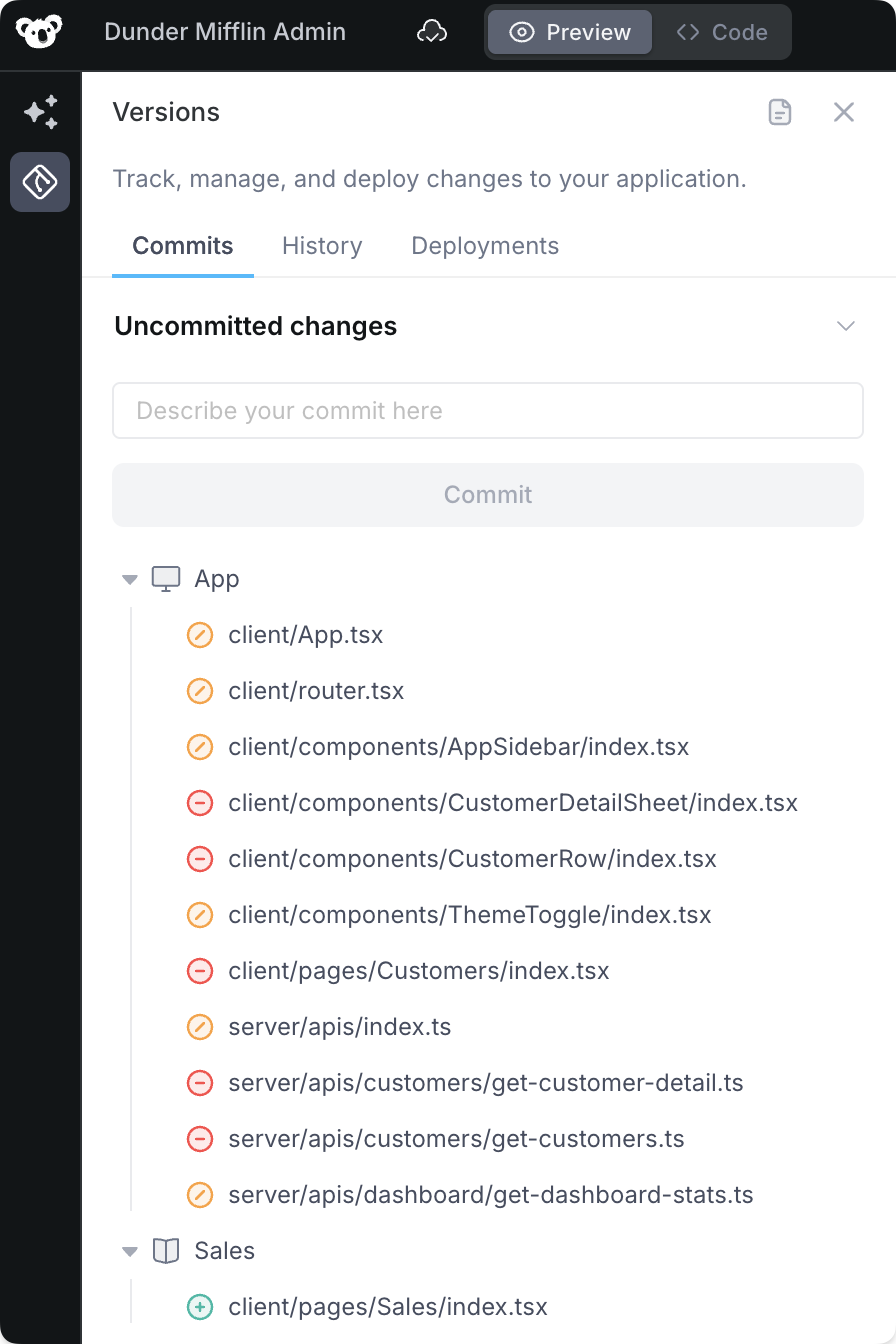 Superblocks **Edit** mode is where you build and iterate on your application.
Edits can be reviewed before committing, helping you understand what changes will be introduced in your next commit.
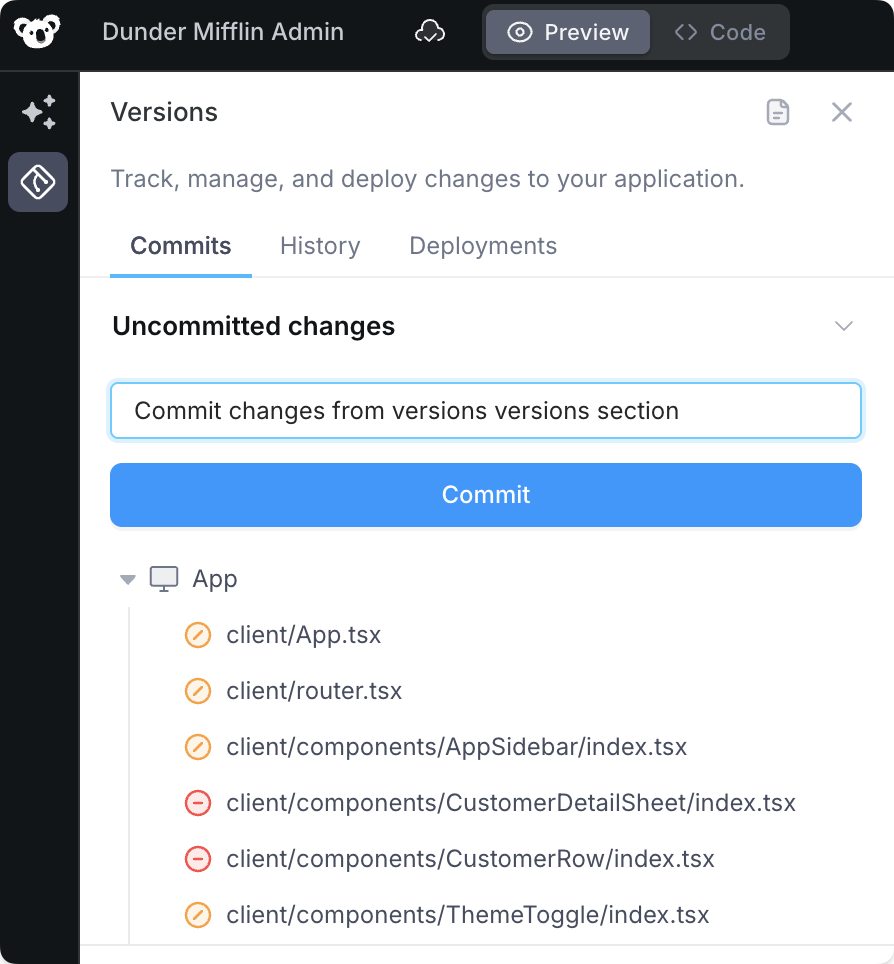
To review what's changed, click on the **Versions** icon in the left navigation, and find the **Uncommitted changes** section under the **Commit** tab.
## Commit
Once you've made all the updates you want, **commit** your changes to create a named version of your application.
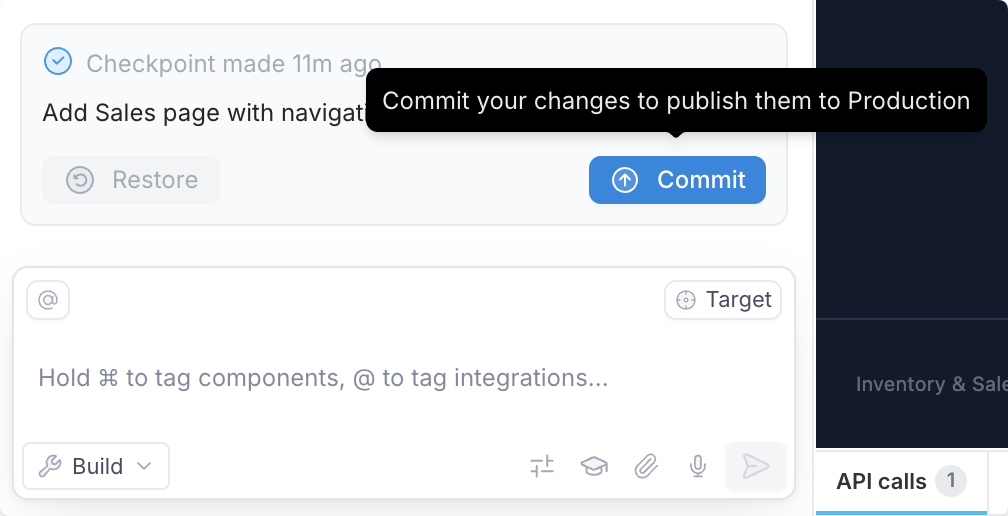
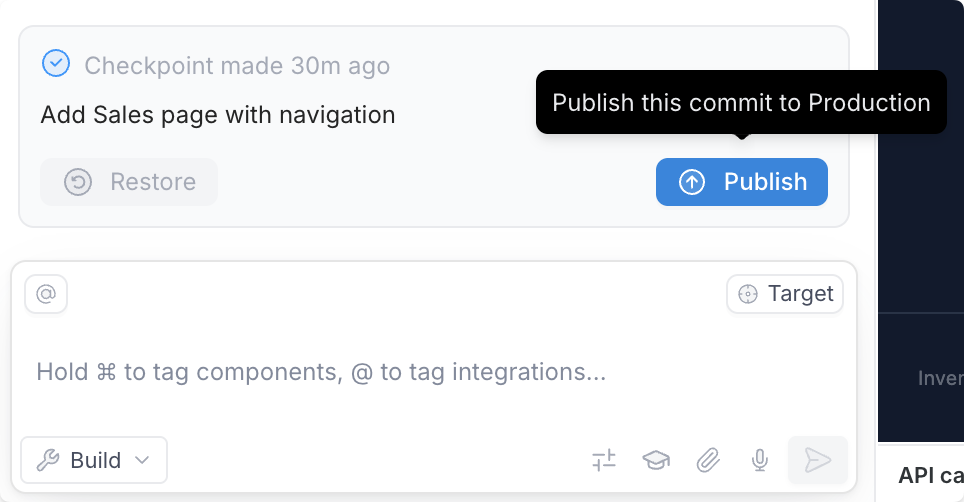
You can create a commit from the **Versions** panel or directly from a [checkpoint](/building-with-clark/checkpoints) in the Clark chat.
Creating a commit will clear out any uncommitted changes and create a named commit that can be previewed and deployed. Committing often makes it easy to share and get feedback on changes as you iterate on tools you build in Superblocks.
## Commit previews
Every commit in Superblocks triggers the build of a dedicated **commit preview**. Commit previews let you test and review changes using a live interactive environment without deploying and impacting your end-users.
To open a commit preview:
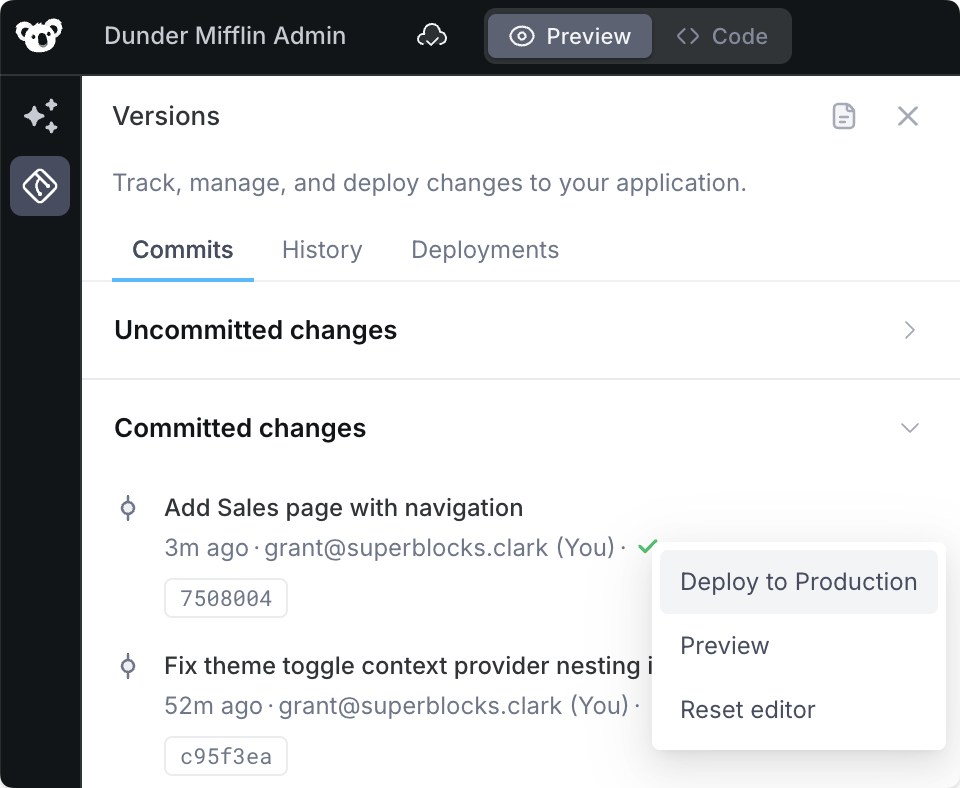
1. Click the **Versions** icon
2. Scroll down to **Committed changes**
3. Click the menu icon for the commit you want to view
4. Click **Preview**
This will open that commit's preview environment at a dedicated URL that you can share with your team to review and get sign-off before changes are deployed.
## Deploy
Once you and your team are happy with your changes, make them live for all users by **deploying**.
You can deploy from the **Versions** panel **Committed changes** section or directly from a [checkpoint](/building-with-clark/checkpoints) in the Clark chat.
To see the currently deployed commit, just look for the commit with the **Live** badge.
## Redeploy
Superblocks **Edit** mode is where you build and iterate on your application.
Edits can be reviewed before committing, helping you understand what changes will be introduced in your next commit.
To review what's changed, click on the **Versions** icon in the left navigation, and find the **Uncommitted changes** section under the **Commit** tab.
## Commit
Once you've made all the updates you want, **commit** your changes to create a named version of your application.
You can create a commit from the **Versions** panel or directly from a [checkpoint](/building-with-clark/checkpoints) in the Clark chat.
Creating a commit will clear out any uncommitted changes and create a named commit that can be previewed and deployed. Committing often makes it easy to share and get feedback on changes as you iterate on tools you build in Superblocks.
## Commit previews
Every commit in Superblocks triggers the build of a dedicated **commit preview**. Commit previews let you test and review changes using a live interactive environment without deploying and impacting your end-users.
To open a commit preview:
1. Click the **Versions** icon
2. Scroll down to **Committed changes**
3. Click the menu icon for the commit you want to view
4. Click **Preview**
This will open that commit's preview environment at a dedicated URL that you can share with your team to review and get sign-off before changes are deployed.
## Deploy
Once you and your team are happy with your changes, make them live for all users by **deploying**.
You can deploy from the **Versions** panel **Committed changes** section or directly from a [checkpoint](/building-with-clark/checkpoints) in the Clark chat.
To see the currently deployed commit, just look for the commit with the **Live** badge.
## Redeploy
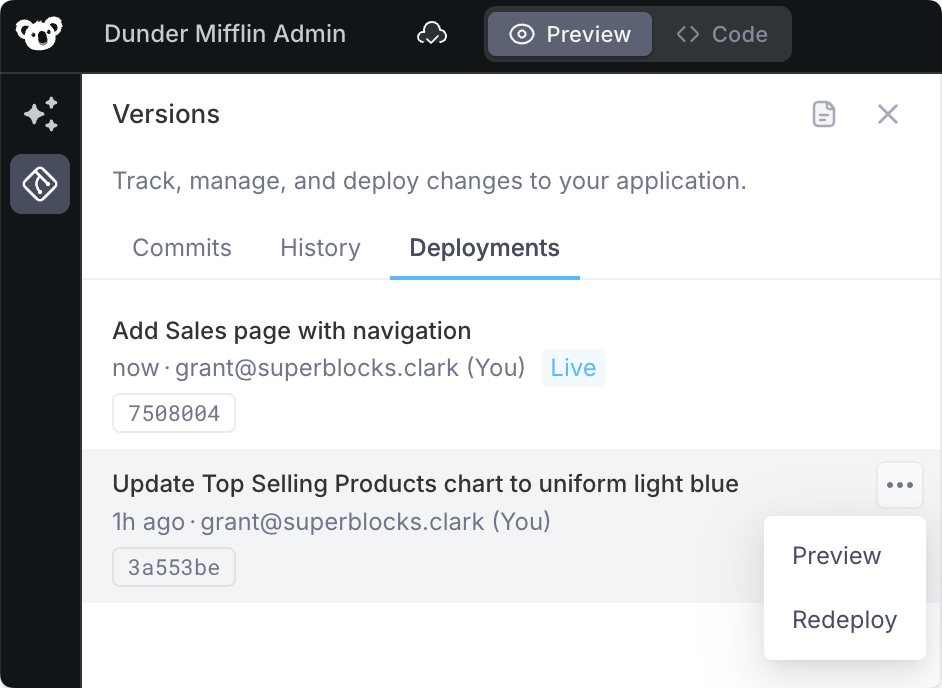 Deployed a bug and need to rollback? No problem, just **redeploy** your last commit.
1. Click on the **Versions** icon in the left nav
2. Go to the **Deployments** tab
3. Open the menu on the second commit in the list
4. Click **Redeploy**
This will rollback to the commit that was live just before your most recent deployment.
## Undeploy
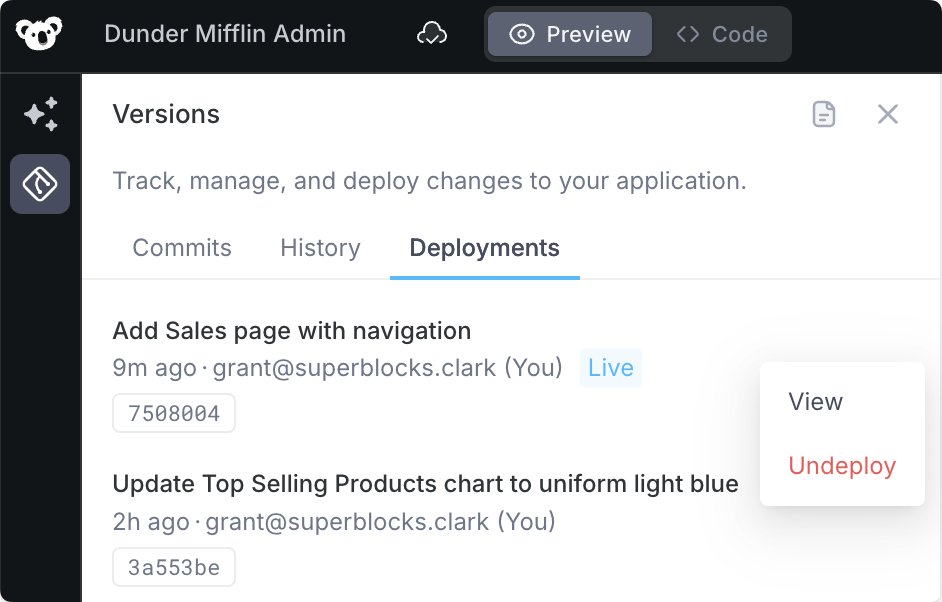
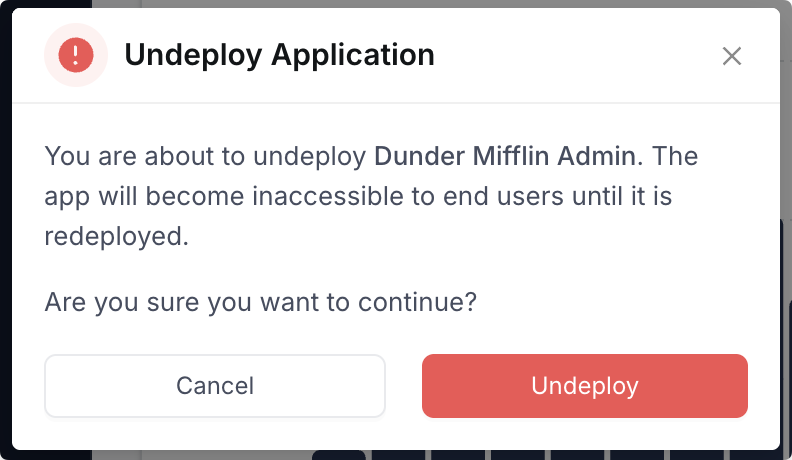
If you ever need to temporarily make an app unavailable to end users, you can **undeploy** the app.
1. Click on the **Versions** icon in the left nav
2. Go to the **Deployments** tab
3. Open the menu on the first live commit in the list
4. Click **Undeploy**
Upon confirmation, the app will no longer be accessible to end users, but you can still work on it in edit mode.
## Reset editor
If you ever find yourself in a situation where you want to completely discard changes you've made to your application, you can discard changes by **resetting the editor**.
To reset your editor:
1. Navigate to the **Versions** panel
2. Find the commit you want to reset the editor to. This can be your last commit (this will discard all uncommitted changes) or an older commit
3. Click **Reset editor**
The Superblocks editor will reload to the state of your application at that specific commit.
Note: changes via **Reset editor** will only impact the application in edit mode. The deployed version of the application will be unaffected. If you need to change the deployed version, see [Redeploy](#redeploy)
Deployed a bug and need to rollback? No problem, just **redeploy** your last commit.
1. Click on the **Versions** icon in the left nav
2. Go to the **Deployments** tab
3. Open the menu on the second commit in the list
4. Click **Redeploy**
This will rollback to the commit that was live just before your most recent deployment.
## Undeploy
If you ever need to temporarily make an app unavailable to end users, you can **undeploy** the app.
1. Click on the **Versions** icon in the left nav
2. Go to the **Deployments** tab
3. Open the menu on the first live commit in the list
4. Click **Undeploy**
Upon confirmation, the app will no longer be accessible to end users, but you can still work on it in edit mode.
## Reset editor
If you ever find yourself in a situation where you want to completely discard changes you've made to your application, you can discard changes by **resetting the editor**.
To reset your editor:
1. Navigate to the **Versions** panel
2. Find the commit you want to reset the editor to. This can be your last commit (this will discard all uncommitted changes) or an older commit
3. Click **Reset editor**
The Superblocks editor will reload to the state of your application at that specific commit.
Note: changes via **Reset editor** will only impact the application in edit mode. The deployed version of the application will be unaffected. If you need to change the deployed version, see [Redeploy](#redeploy)