> ## Documentation Index
> Fetch the complete documentation index at: https://docs.superblocks.com/llms.txt
> Use this file to discover all available pages before exploring further.
# Superblocks in Claude
> Build, edit, and publish governed Superblocks apps without leaving Claude
export const Alert = ({type, title, children}) => {
const variant = ["info", "success", "warning", "danger", "note"].includes(type) ? type : "note";
return
{title &&
{title}
}
{children}
;
};
Superblocks in Claude is in beta. Reach out to your Superblocks account team to request access.
## Overview
Superblocks in Claude lets you build in Superblocks without leaving Claude. Add Superblocks to Claude, then ask in plain language to import, build, edit, or publish an app. Clark does the work in Superblocks, and your app appears right alongside the conversation.
Many builders and business users already prototype in Claude and want to take that work to production in a governed way. Superblocks in Claude meets them where they are, with no separate onboarding and no new tool to learn. The apps they ship land on Superblocks with your organization's guardrails already applied.
## What you can do
* **Start a new app**: Ask Claude to build a new app in Superblocks and get an editor link back.
* **Import an existing app**: Bring a prototype you built in Claude into Superblocks. Clark imports the app, replaces integrations with your governed data sources, and adds platform authentication and RBAC.
* **Edit an app**: Describe a change and Clark starts building against your existing app.
* **Publish an app**: Ask to deploy and get a deployed link back, after [Code Security](/admin/code-security/index) policies run.
## How it works
### 1. Connect Superblocks to Claude
An admin or builder adds the Superblocks connector in Claude. Setup instructions are shared with beta participants.
### 2. Ask in natural language
Prompt Claude the same way you already do:
```
"Import this app into Superblocks, connect it to our Postgres
database, and send me the editor link."
```
```
"Add an approvals table to my Superblocks expense app and
publish it."
```
### 3. Plan and refine with Clark
Clark works with you conversationally in Claude, just like in the Superblocks UI. Before building, it can ask clarifying questions about functionality, data, and design, inspect your integration metadata, and propose a plan, right in the chat. You answer in the same thread, and Clark refines its approach before it starts building. See [Plan & Build modes](/building-with-clark/plan-and-build-modes) for how this works in the editor.
### 4. See your app side by side
Your app renders embedded in Claude, side by side with the conversation that built it. Click through it, ask for a change ("make the table sortable"), and see the result in place without switching to a browser tab.
When you're ready, open the app in the Superblocks editor or share its deployed link.
## Governed by default
Prototypes built directly in AI tools tend to hardcode credentials and reinvent auth and permissions app by app, which becomes a security risk and tech debt as they multiply. Superblocks applies governance at the platform level rather than per app: connected integrations, authentication, RBAC, and policies are managed centrally, so a change made once applies to every app. Apps you build from Claude inherit that same model automatically.
* **Identity-aware**: Claude acts as you, with your identity resolved through your SSO provider and mapped to your permissions in Superblocks, so builders only do what their role allows.
* **RBAC and integrations**: Imported apps are rewritten to use your connected [integrations](/integrations/overview) and platform-managed [authentication and RBAC](/admin/org-administration/rbac) instead of hardcoded credentials.
* **Code Security**: Publishing runs [Code Security](/admin/code-security/index) policies, and every app keeps native version control and one-click deploy.
## Superblocks in Claude vs. Admin MCP
Superblocks in Claude is for building apps. The [Admin MCP](/admin/mcp-server) is for administering the platform from AI coding agents like Cursor and Claude Code.
## Related
Bring prototypes from Claude, Replit, Lovable, v0, and more into Superblocks today
Connect AI coding agents like Cursor and Claude Code to administer your Superblocks org
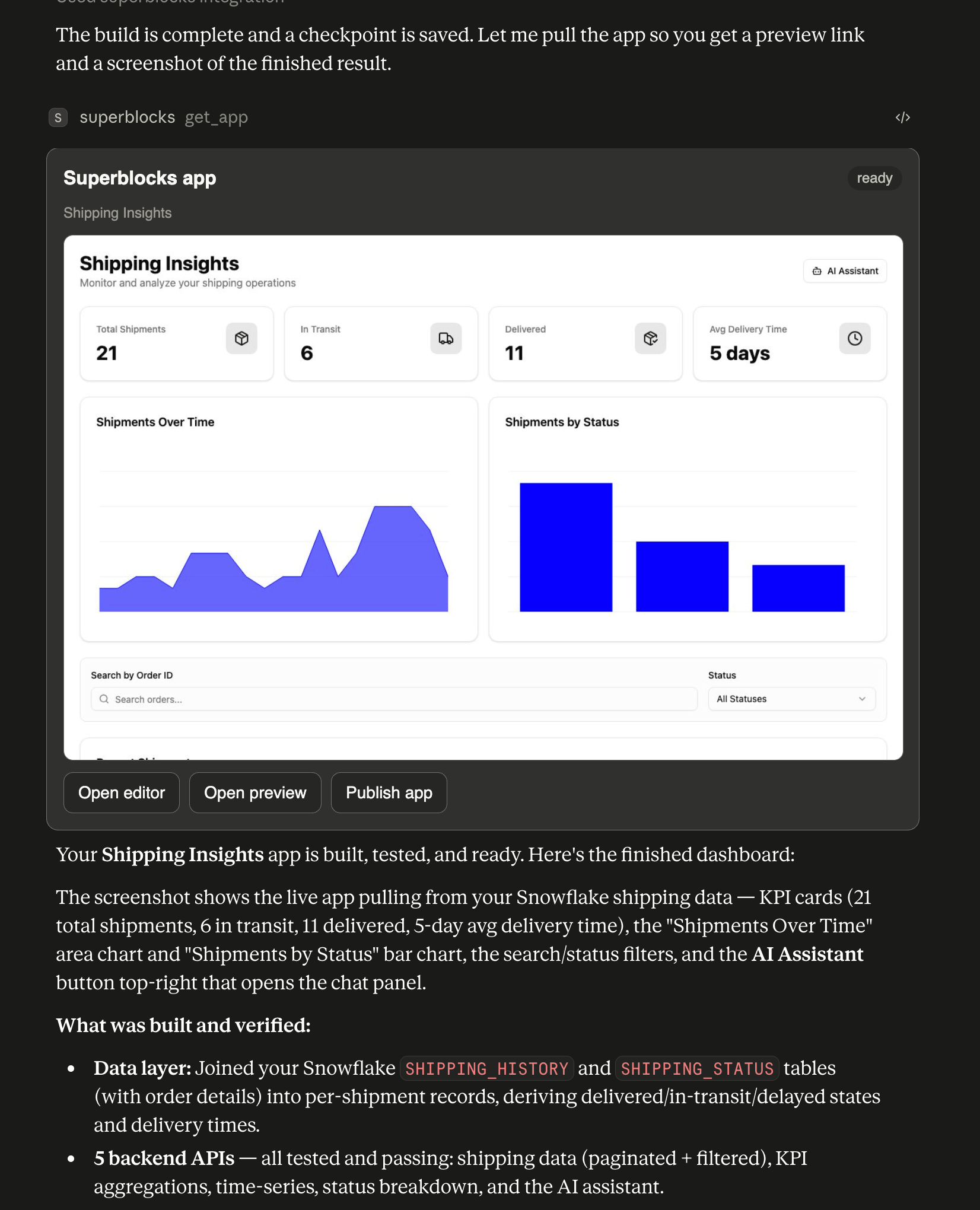 When you're ready, open the app in the Superblocks editor or share its deployed link.
## Governed by default
Prototypes built directly in AI tools tend to hardcode credentials and reinvent auth and permissions app by app, which becomes a security risk and tech debt as they multiply. Superblocks applies governance at the platform level rather than per app: connected integrations, authentication, RBAC, and policies are managed centrally, so a change made once applies to every app. Apps you build from Claude inherit that same model automatically.
* **Identity-aware**: Claude acts as you, with your identity resolved through your SSO provider and mapped to your permissions in Superblocks, so builders only do what their role allows.
* **RBAC and integrations**: Imported apps are rewritten to use your connected [integrations](/integrations/overview) and platform-managed [authentication and RBAC](/admin/org-administration/rbac) instead of hardcoded credentials.
* **Code Security**: Publishing runs [Code Security](/admin/code-security/index) policies, and every app keeps native version control and one-click deploy.
## Superblocks in Claude vs. Admin MCP
Superblocks in Claude is for building apps. The [Admin MCP](/admin/mcp-server) is for administering the platform from AI coding agents like Cursor and Claude Code.
## Related
When you're ready, open the app in the Superblocks editor or share its deployed link.
## Governed by default
Prototypes built directly in AI tools tend to hardcode credentials and reinvent auth and permissions app by app, which becomes a security risk and tech debt as they multiply. Superblocks applies governance at the platform level rather than per app: connected integrations, authentication, RBAC, and policies are managed centrally, so a change made once applies to every app. Apps you build from Claude inherit that same model automatically.
* **Identity-aware**: Claude acts as you, with your identity resolved through your SSO provider and mapped to your permissions in Superblocks, so builders only do what their role allows.
* **RBAC and integrations**: Imported apps are rewritten to use your connected [integrations](/integrations/overview) and platform-managed [authentication and RBAC](/admin/org-administration/rbac) instead of hardcoded credentials.
* **Code Security**: Publishing runs [Code Security](/admin/code-security/index) policies, and every app keeps native version control and one-click deploy.
## Superblocks in Claude vs. Admin MCP
Superblocks in Claude is for building apps. The [Admin MCP](/admin/mcp-server) is for administering the platform from AI coding agents like Cursor and Claude Code.
## Related