> ## Documentation Index
> Fetch the complete documentation index at: https://docs.superblocks.com/llms.txt
> Use this file to discover all available pages before exploring further.
# Vulnerabilities
> Monitor npm package vulnerabilities across published apps in Security Center and remediate findings with Clark
Vulnerability monitoring is currently in **beta**. [Contact support](mailto:support@superblocks.com) to get on the waitlist.
**Security Center** gives admins a single view of npm package vulnerabilities across every published application in the organization. Superblocks matches deployed package versions against known advisories, so newly disclosed CVEs surface even when the app itself has not changed.
## Security Center
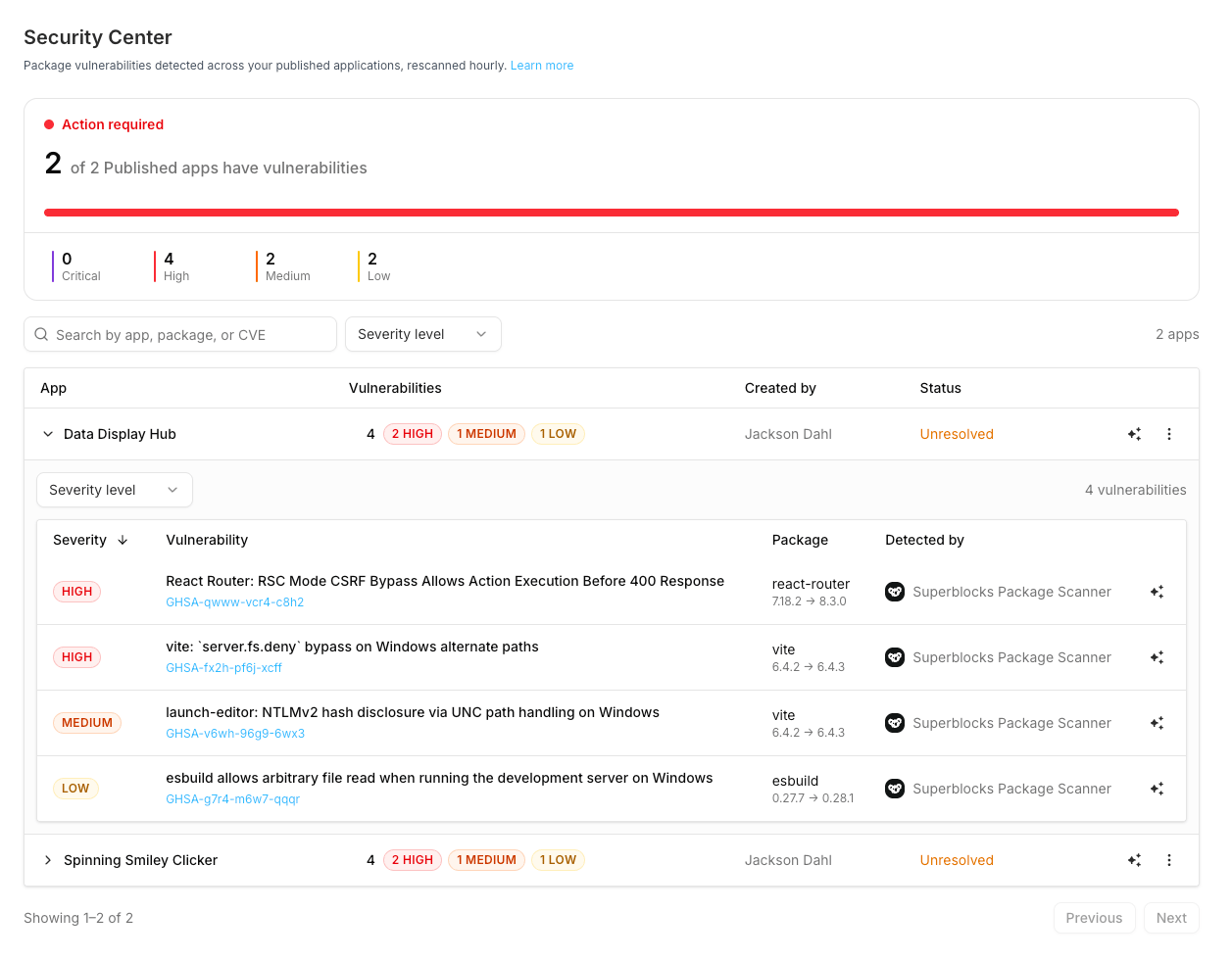
Security Center lives under **Security** in the dashboard. Admins with **policies:manage** see open npm vulnerabilities across published applications, grouped by app, prioritized by severity, and refreshed as new advisories appear.
### What it shows
 | Surface | Purpose |
| -------------------- | --------------------------------------------------------------------------------------------------- |
| **Summary** | How many published apps have vulnerabilities, plus counts by severity (Critical, High, Medium, Low) |
| **Dependency scans** | One row per affected published app, with vulnerability count, creator, and status |
| **Advisories** | Expand a row for each finding: severity, advisory ID (OSV), package, and detector |
The table lists only apps that need attention. Apps with no open vulnerabilities are left out, so an empty table means your published fleet is clean. Each listed app carries one of two statuses:
| Status | Meaning |
| ---------------- | -------------------------------------------------------------------------------------------------------------- |
| **Unresolved** | The deployed commit has open package vulnerabilities |
| **Needs review** | No advisory matched, but the exact installed version could not be determined, so the app is not verified clean |
For **Unresolved** apps, use **Fix with Clark** or **Unpublish**. For **Needs review**, treat the app as unverified: commit a lockfile (or otherwise pin exact versions) and republish so Superblocks can match advisories against real installed versions.
Search by app name, package, or CVE / advisory ID. Filter by severity. A **Low confidence** badge marks findings where Superblocks could not pin an exact version (for example, no lockfile, so the minimum of the declared range was used).
### What is scanned
* **Scope:** Published applications with a deployed commit
* **Packages:** Dependencies from the deployed commit (`package.json` plus lockfile-resolved versions when available)
* **Ecosystem:** npm
* **Advisory source:** [OSV](https://osv.dev) npm feed
* **Detector:** Superblocks Package Scanner
Scans evaluate the **deployed** package set (what is live), not an uncommitted local workspace. Superblocks refreshes its vulnerability index every hour, so findings you see in Security Center stay current within that window as new advisories are published.
### Fix with Clark
From Security Center, click **Fix with Clark** on an app or an individual advisory:
1. The app opens in the editor with a pre-built remediation prompt
2. Clark upgrades vulnerable packages to safe versions and keeps the app building
3. Publish (or redeploy) so the deployed package index updates
4. Security Center reflects the remediated packages on the next scan
Admins can also **Unpublish** a vulnerable app. Unpublish immediately takes the app offline for all end users; republish (or redeploy) after the fix to restore access. Fix with Clark and Unpublish require deploy access on the target application.
## Permissions
| Action | Permission |
| ----------------------------------------------- | --------------------------------------- |
| Open Security Center, view scans and advisories | `policies:manage` |
| Fix with Clark / Unpublish from Security Center | Deploy access on the target application |
## Related
* [Policy Agents overview](/admin/policy-agents/index)
* [Security scanning](/admin/policy-agents/security-scanning)
* [Audit logs](/admin/audit-logs)
| Surface | Purpose |
| -------------------- | --------------------------------------------------------------------------------------------------- |
| **Summary** | How many published apps have vulnerabilities, plus counts by severity (Critical, High, Medium, Low) |
| **Dependency scans** | One row per affected published app, with vulnerability count, creator, and status |
| **Advisories** | Expand a row for each finding: severity, advisory ID (OSV), package, and detector |
The table lists only apps that need attention. Apps with no open vulnerabilities are left out, so an empty table means your published fleet is clean. Each listed app carries one of two statuses:
| Status | Meaning |
| ---------------- | -------------------------------------------------------------------------------------------------------------- |
| **Unresolved** | The deployed commit has open package vulnerabilities |
| **Needs review** | No advisory matched, but the exact installed version could not be determined, so the app is not verified clean |
For **Unresolved** apps, use **Fix with Clark** or **Unpublish**. For **Needs review**, treat the app as unverified: commit a lockfile (or otherwise pin exact versions) and republish so Superblocks can match advisories against real installed versions.
Search by app name, package, or CVE / advisory ID. Filter by severity. A **Low confidence** badge marks findings where Superblocks could not pin an exact version (for example, no lockfile, so the minimum of the declared range was used).
### What is scanned
* **Scope:** Published applications with a deployed commit
* **Packages:** Dependencies from the deployed commit (`package.json` plus lockfile-resolved versions when available)
* **Ecosystem:** npm
* **Advisory source:** [OSV](https://osv.dev) npm feed
* **Detector:** Superblocks Package Scanner
Scans evaluate the **deployed** package set (what is live), not an uncommitted local workspace. Superblocks refreshes its vulnerability index every hour, so findings you see in Security Center stay current within that window as new advisories are published.
### Fix with Clark
From Security Center, click **Fix with Clark** on an app or an individual advisory:
1. The app opens in the editor with a pre-built remediation prompt
2. Clark upgrades vulnerable packages to safe versions and keeps the app building
3. Publish (or redeploy) so the deployed package index updates
4. Security Center reflects the remediated packages on the next scan
Admins can also **Unpublish** a vulnerable app. Unpublish immediately takes the app offline for all end users; republish (or redeploy) after the fix to restore access. Fix with Clark and Unpublish require deploy access on the target application.
## Permissions
| Action | Permission |
| ----------------------------------------------- | --------------------------------------- |
| Open Security Center, view scans and advisories | `policies:manage` |
| Fix with Clark / Unpublish from Security Center | Deploy access on the target application |
## Related
* [Policy Agents overview](/admin/policy-agents/index)
* [Security scanning](/admin/policy-agents/security-scanning)
* [Audit logs](/admin/audit-logs)